Pluto+ SDR as Vector Network Analyzer with SATSAGEN
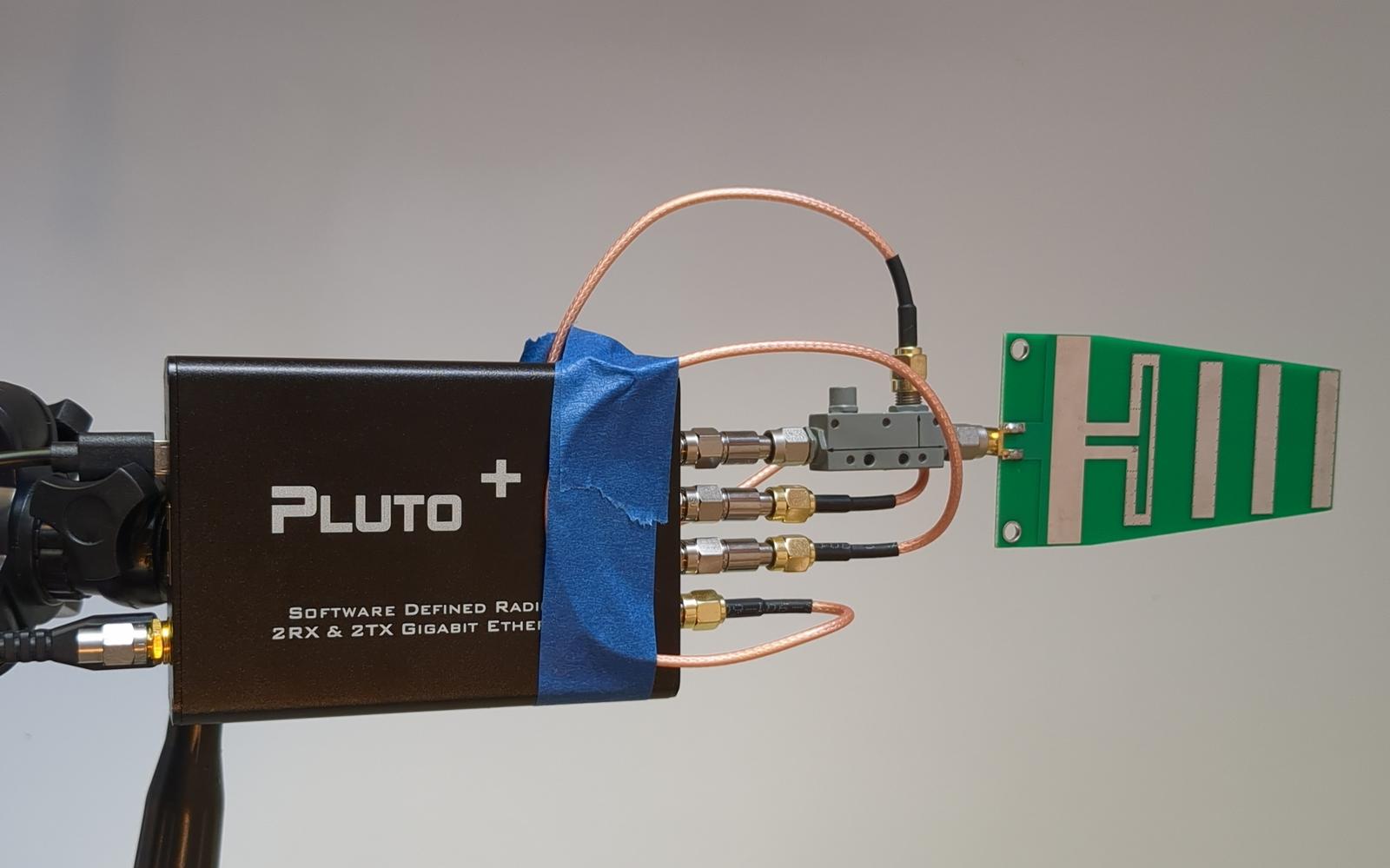
At the time of writing this article, I’m in the process of setting up my amateur radio station for working through the Es’hail 2/QO-100 satellite. QO-100 is the first geostationary satellite with an amateur radio transponder, which covers all of Europe, Africa, a major part of Asia and even Brazil!
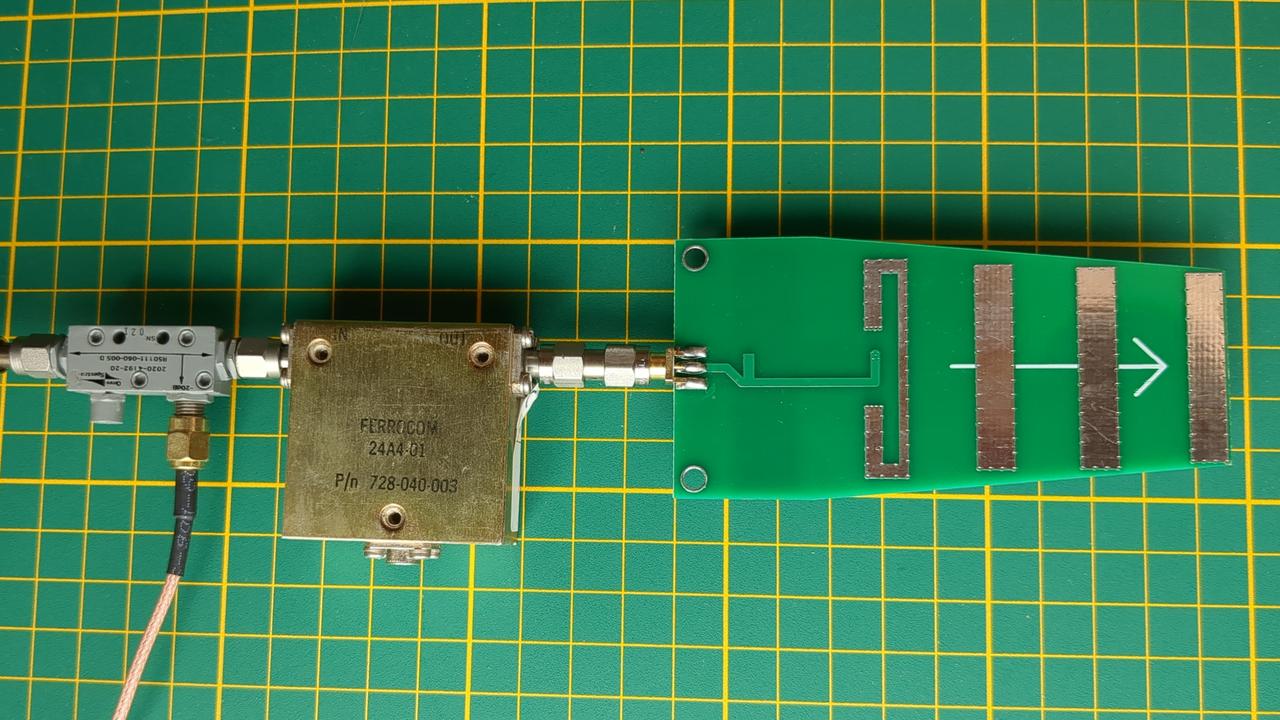
The satellite’s downlink is at 10.5 GHz. Listening is easily done with any satellite TV dish with an LNB and any SDR which can receive around 740 MHz. The uplink to the satellite is, however, at 2.4 GHz. Coincidentally, 2.4 GHz is an ISM band (used by Wi-Fi, Bluetooth etc.), so there are plenty of ready-made antennas for this frequency, for example a miniature Yagi antenna tested below.
Although such antennas are workable, the best results for QO-100 are achieved with a dedicated antenna, which emits radio waves with RHCP (right-hand circular polarization). Thus, I built DC8PAT’s helix antenna. That necessitates a way to tune it properly.
Introduction
The best equipment to measure anything radio-related is a vector network analyzer. I myself own a NanoVNA-H, one of many versions of the NanoVNA vector network analyzer. It works theoretically up to 1500 MHz, which is a little too low for 2.4 GHz. A popular option would be to buy a NanoVNA V2, which supports up to 3 GHz (or even 4.4 GHz in the V2 Plus4 variant). I didn’t want to do that since I own the -H version and that would be multiplying the entities and cluttering my lab.
Investigating other options, I was relieved when I found SATSAGEN software. This great piece of software can turn the Pluto+ SDR into many laboratory instruments: spectrum analyzer, VNA, signal generator and more! I already had the Pluto+, since I need it for QO-100 anyway. With a simple hack, it can work up to 6 GHz, perhaps even more with harmonic modes. Perfect!
I assume the reader knows the basics of VNA operation, for example, because they own a NanoVNA themselves. The described setup will have similar performance: it measures the S11 and S21 coefficients with comparable dynamic range, but a higher maximum frequency.
Note
For Polish readers: Piotr Górecki described the NanoVNA and the theory behind the VNA measurements in an excellent series of articles in Elektronika dla Wszystkich:
- NanoVNA, czyli superultra… omomierz, parts 1 and 2 — EdW 8/2021 and 9/2021,
- NanoVNA – wykonaj precyzyjne pomiary, parts 1 – 4 — EdW 12/2021, 2/2022, 3/2022 and 5/2022.
The articles are also publicly available on Piotr Górecki’s website Zrozumieć Elektronikę: MR091, MR092, MR093, MR094, MR095, MR096.
The documentation for SATSAGEN is sparse and scattered over blog posts and YouTube videos. The VNA mode usage is described on the author’s website, together with the index of other topics; some basics are also in a YouTube video. I wanted to add my own notes, so I wrote this article.
In this article I’ll show some measurements of 2.4 GHz ISM band equipment, sometimes called 13 cm band by radio amateurs. The devices under test (DUTs) will be 2.4 GHz antennas, a variable attenuator and a microwave isolator. Should I ever start playing with other UHF/microwave bands, I will update this article.
Hardware
In order to set up a VNA measuring rig, we need an SDR transceiver and the accompanying RF equipment: a directional coupler, SMA cables, RF attenuators/pads. We will also need a VNA calibration kit. If one wants to measure only the transmission coefficient (S21) and skip the reflection coefficient (S11), then one can even get away with just pigtails, attenuators and an SMA female-to-female barrel. As a curiosity, I calculated the overall cost of my setup (excluding the Pluto+):
| Item | Cost (EUR) |
|---|---|
| Directional coupler | 14.00 |
| Three 10 dB attenuators | 10.35 |
| SMA cables | 3.50 |
| SOL calibration kit with barrel | 3.50 |
| Total | 31.35 |
Variants of Pluto SDR
Pluto+ is an experimental SDR platform, derived from a well-known ADALM-Pluto from Analog Devices. Based on the AD9363 (an RF Agile Transceiver chip), it features two 325 MHz – 3.8 GHz receivers and two transmitters. The nominal output power is up to about +7 dBm (from the ADALM-Pluto specification), but on the Pluto+ it varies considerably with frequency. People report the poor quality of the output RF transformers (baluns) as the reason. For VNA use this doesn’t matter much, as the calibration takes the frequency response into account. A well-known hack allows extending the frequency range to 70 MHz – 6 GHz. As is usual with AliExpress-grade equipment, it is manufactured in several versions without clearly defined company branding. I got mine from the store OpenSourceSDRLab.
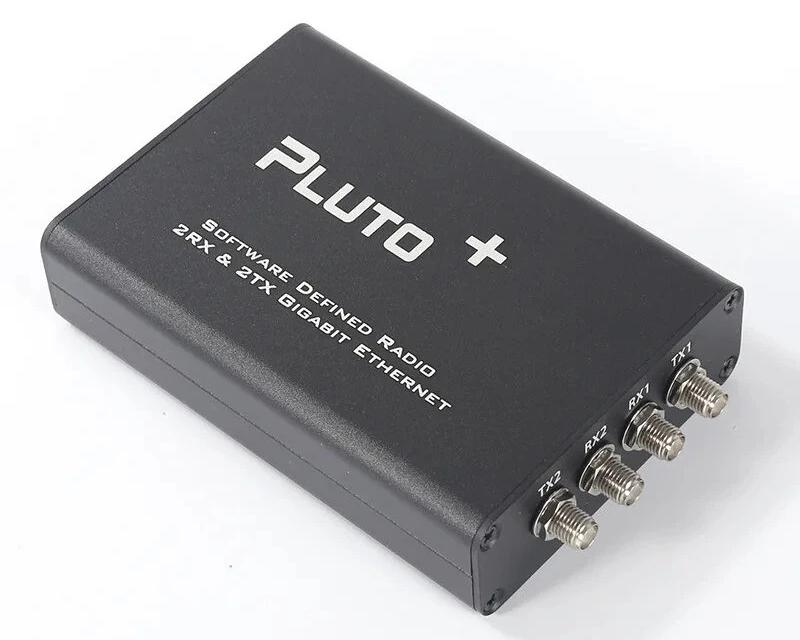
The Pluto+ has a USB port and a 1 Gbit/s Ethernet port for communication. The Ethernet is very useful for more advanced SDR applications since it allows scoping multi-megahertz bandwidths of spectrum, but for VNA use, USB is perfectly sufficient.
The micro-USB cables which came with my Pluto+ were of abysmal quality; I replaced them outright with better ones. Even when I connect it to the
computer via the DATA USB port, I supply additional power with a separate USB power supply connected to the 5V-IN port. The power
supply has to be a beefy one; I use a 3 A phone charger. Without additional power, the Pluto+ tends to hang during initialization.
The Pluto+ is the only SDR device I tested; however, SATSAGEN supports VNA mode with many other SDRs based on variants of the AD9361 chip. As of version v.0.9.4.2, the supported devices are:
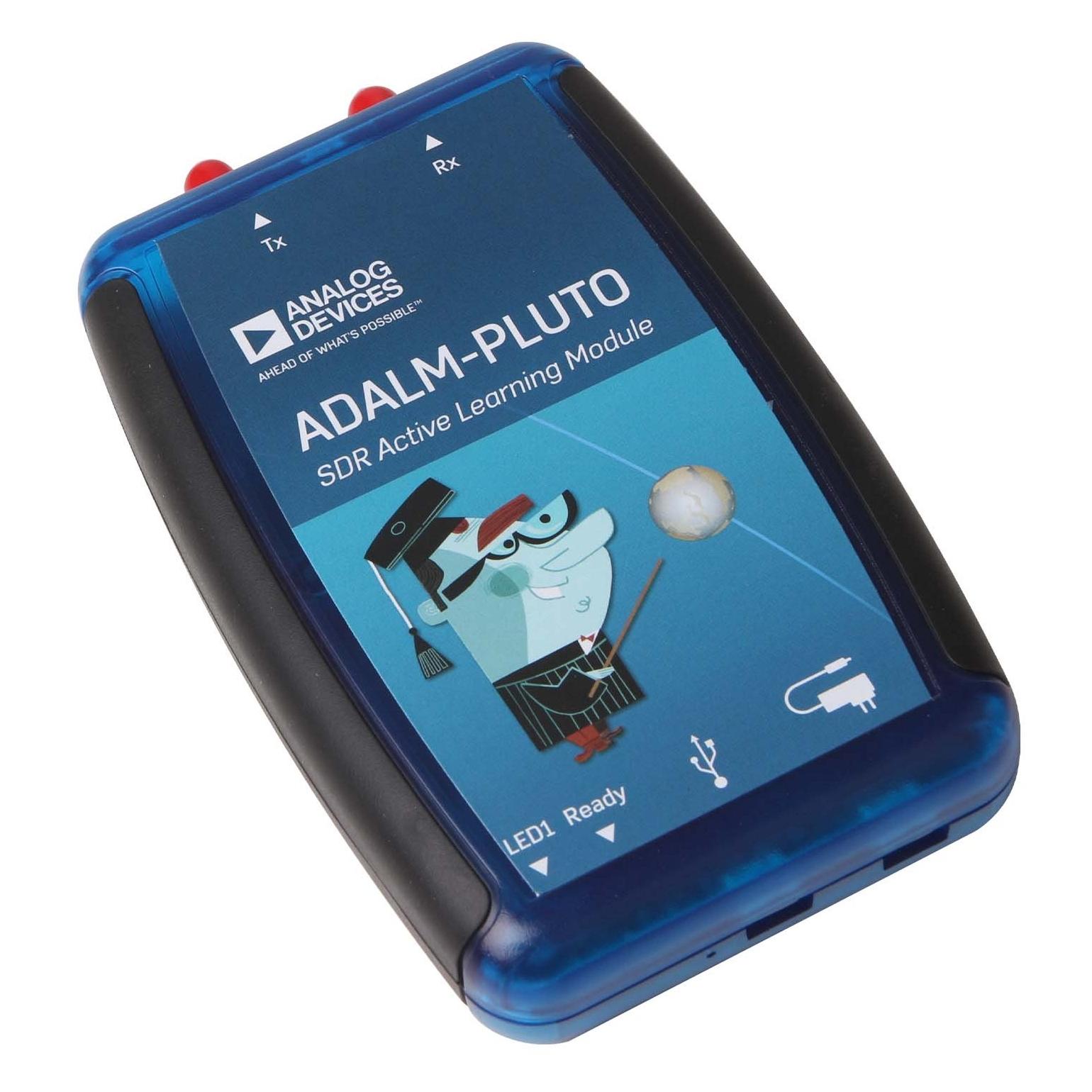
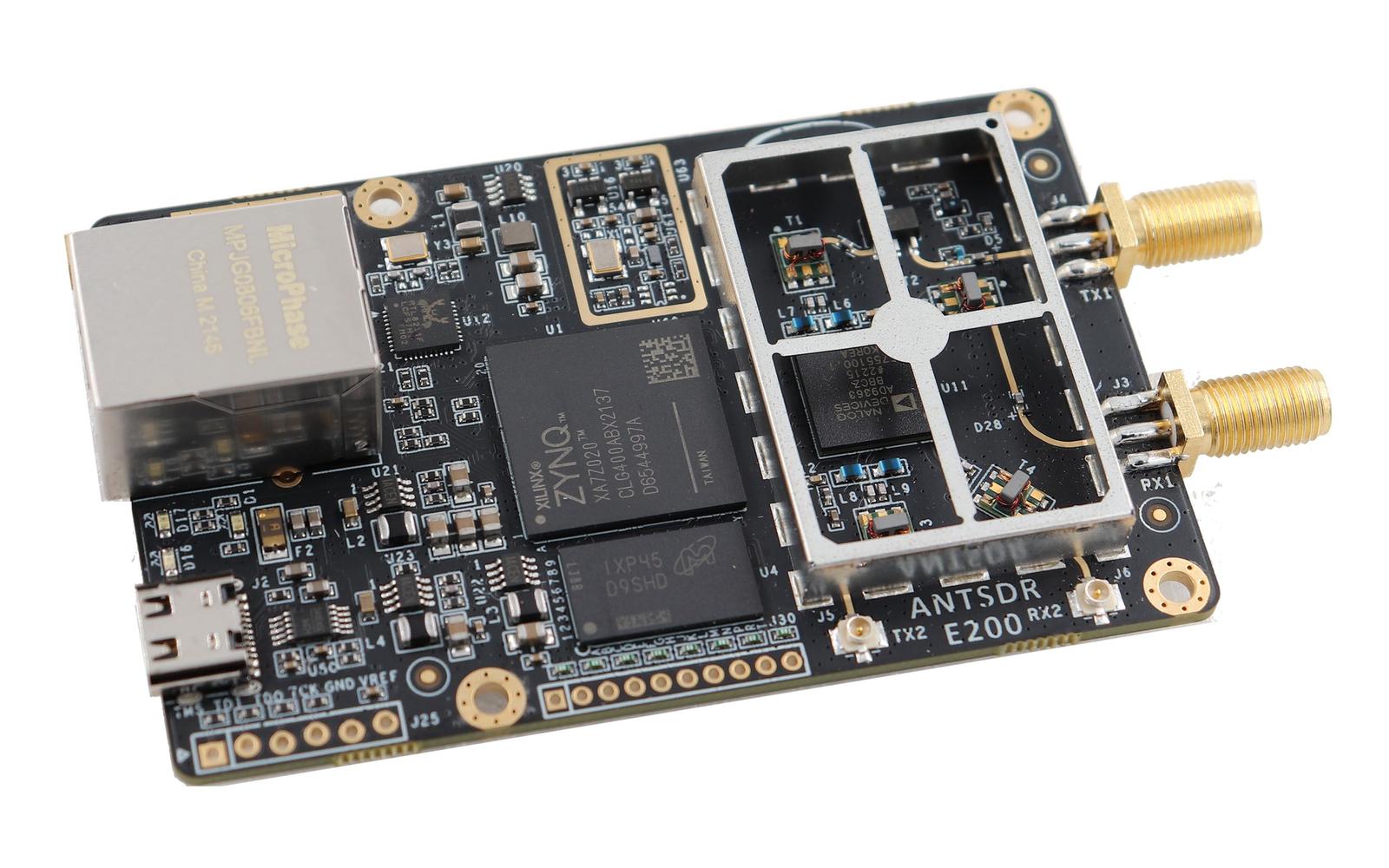
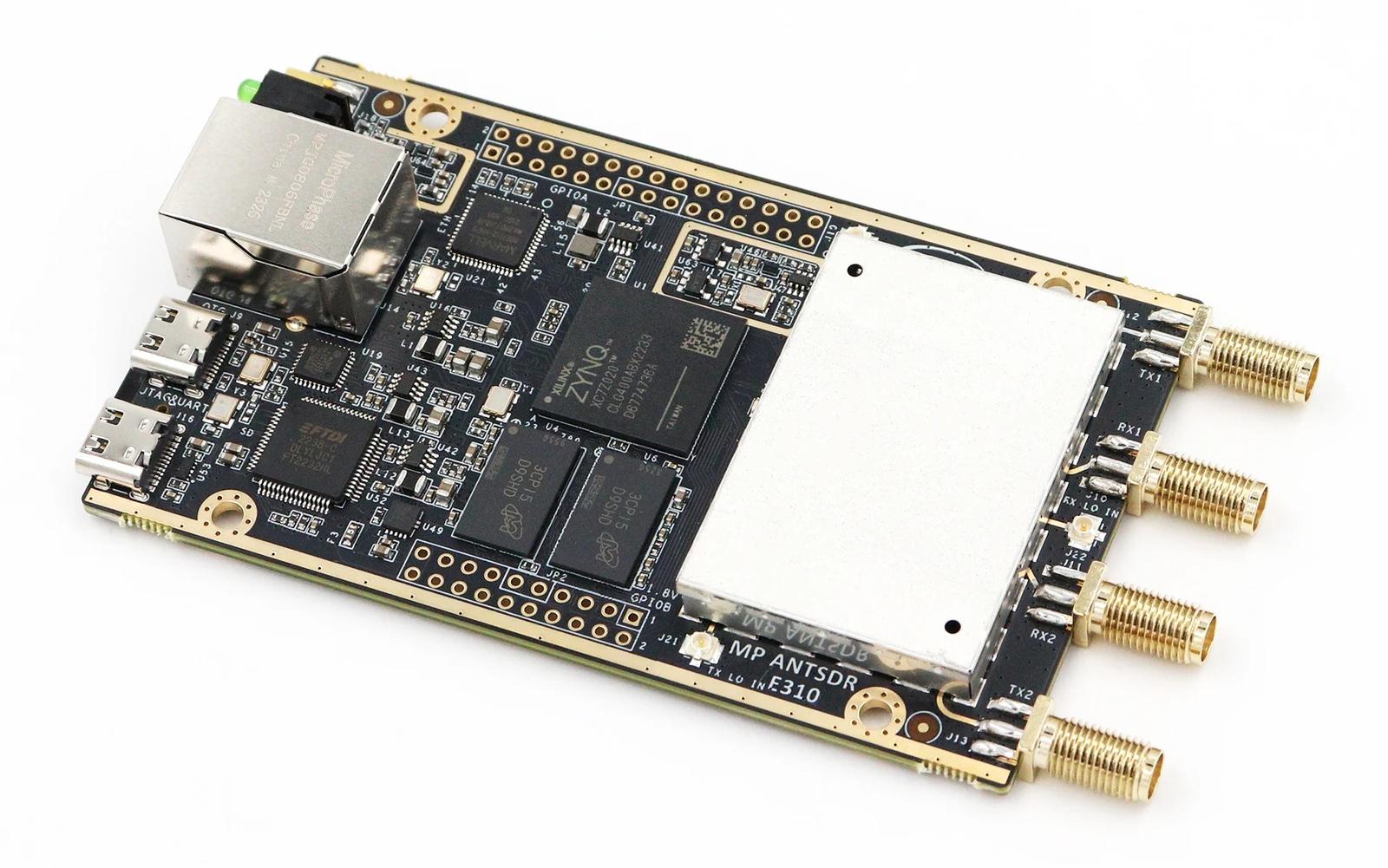
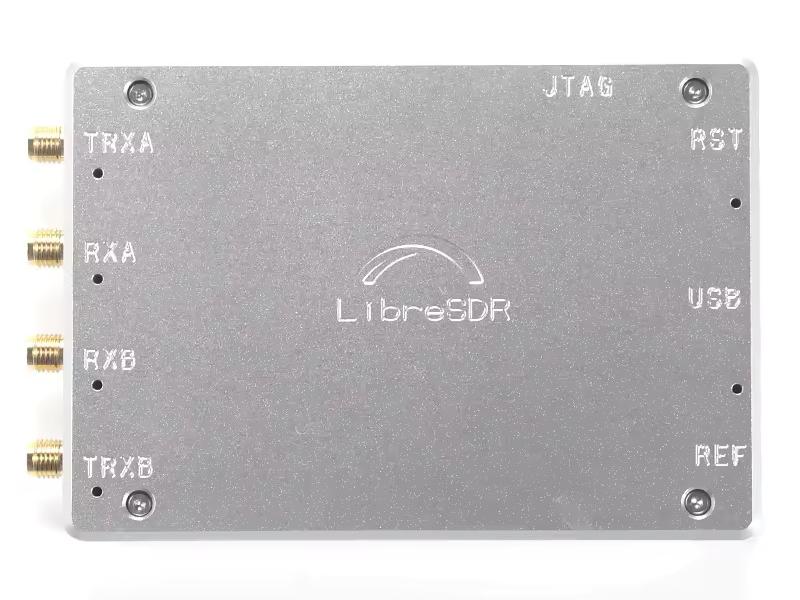
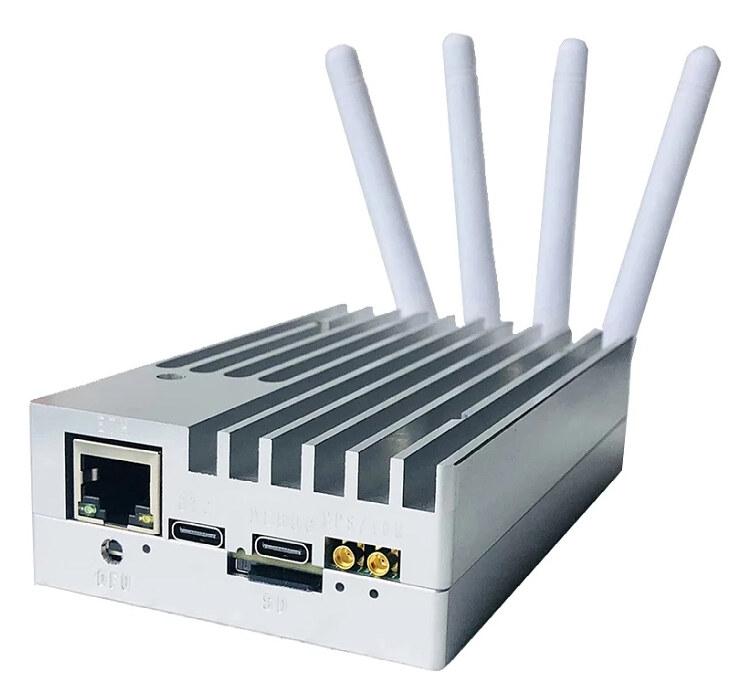
Some of these SDRs are bare boards. This might be a problem at higher frequencies. At least at 2.4 GHz, I noticed the measurements were garbage when I had my Pluto’s enclosure open. So, your mileage may vary.
Directional coupler and attenuators
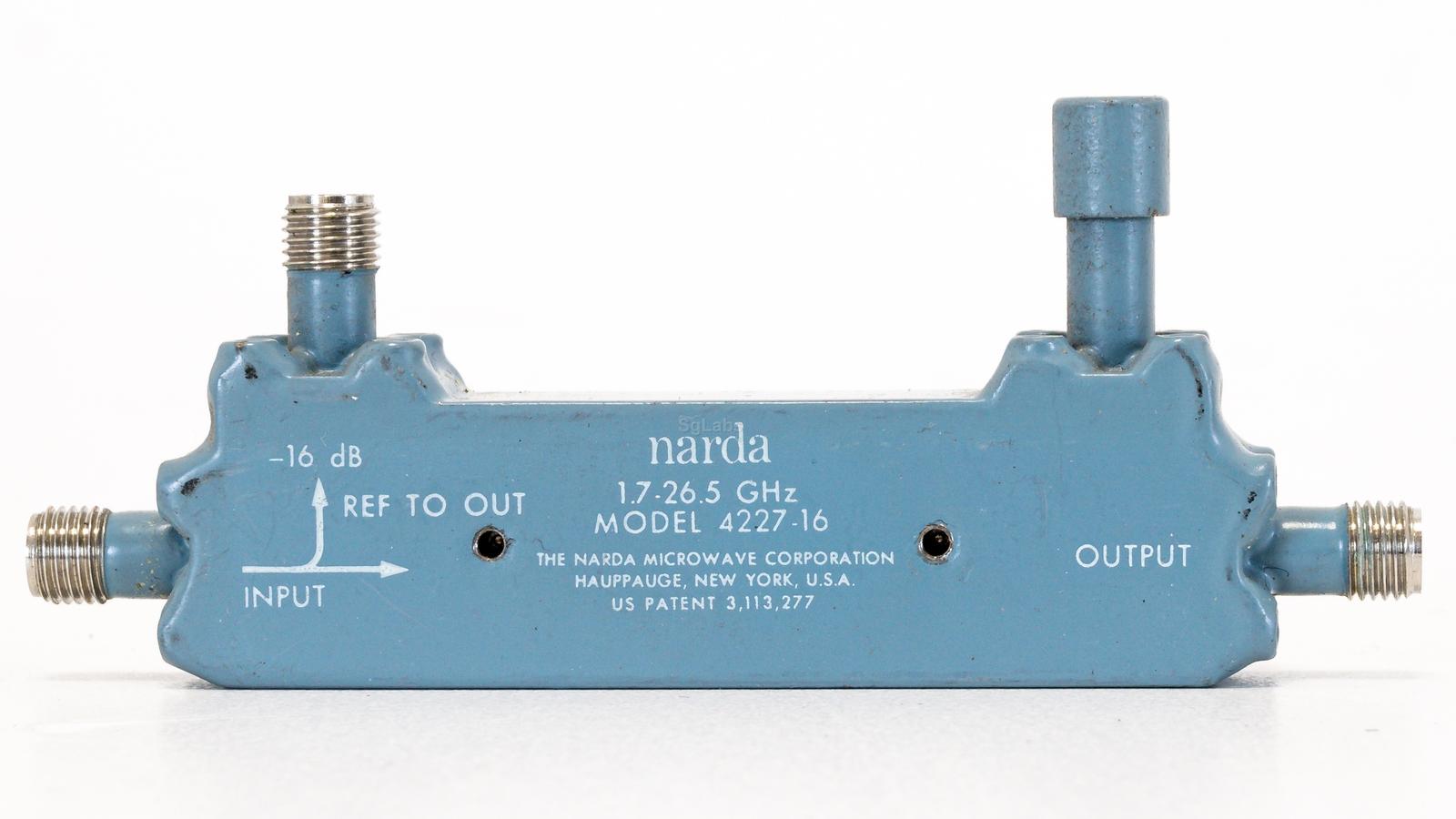
As the SATSAGEN author’s VNA guide indicates, you’ll also need a VNA calibration kit, attenuators/pads, and a directional coupler or RF bridge. A directional coupler uses electromagnetic coupling between two transmission lines, giving low insertion loss and good directivity, but only over a limited bandwidth (typically an octave or so). On the other hand, an RF bridge works like a Wheatstone bridge. It balances the DUT’s impedance against a known reference, making it inherently broadband, often from near-DC up to several GHz. The disadvantages, however, are higher insertion loss and lower directivity than a good coupler. The NanoVNA itself uses an RF bridge.
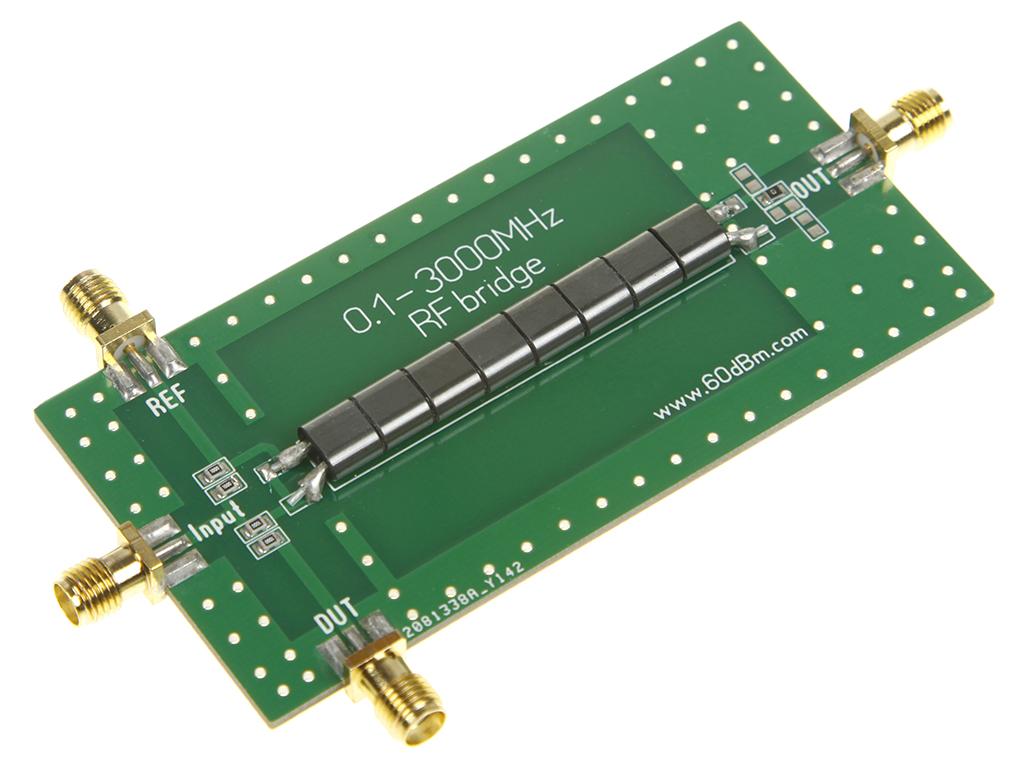
The only easily-accessible RF bridges are the ones from AliExpress. An AliExpress bridge, like the one pictured above, can be used up to 1.5 GHz, as shown in the author’s guide. But its specified directivity and coupling flatness are said to be considerably worse. I don’t have any numbers for that, though.
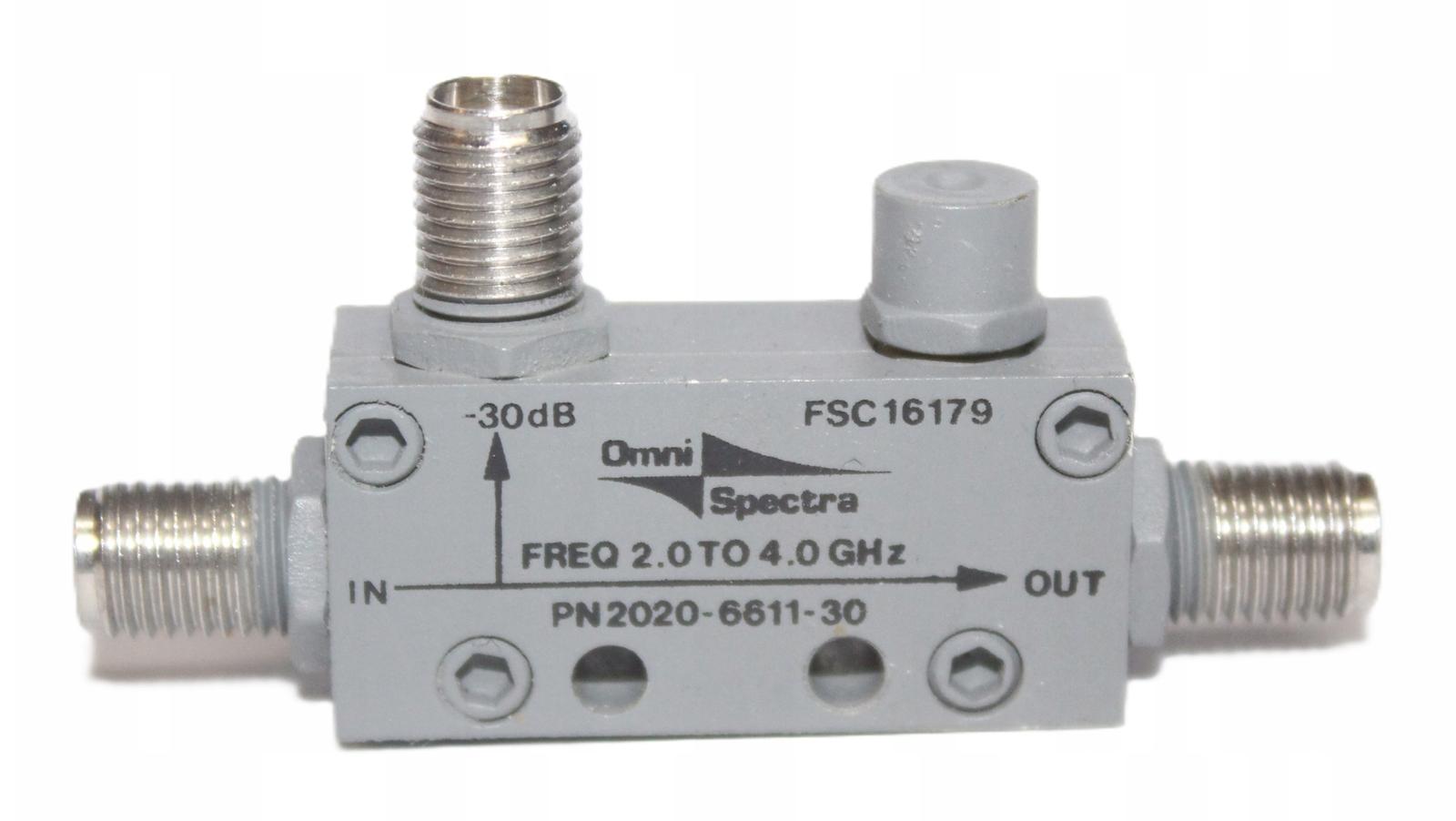
When it comes to directional couplers, however, there seems to be a lot of surplus microwave equipment available online. So I bought a 20 dB directional coupler manufactured by Omni Spectra, similar to the one pictured above. The seller claimed it works in the range 2.3 – 3.6 GHz. All markings on my coupler for reference:
Omni Spectra
2020-4192-20
R50111-060-005 D
Note that the coupler is only needed for the S11 (reflection) measurement. For S21, the transmitter and receiver are simply connected through the DUT and attenuators, no coupler required.
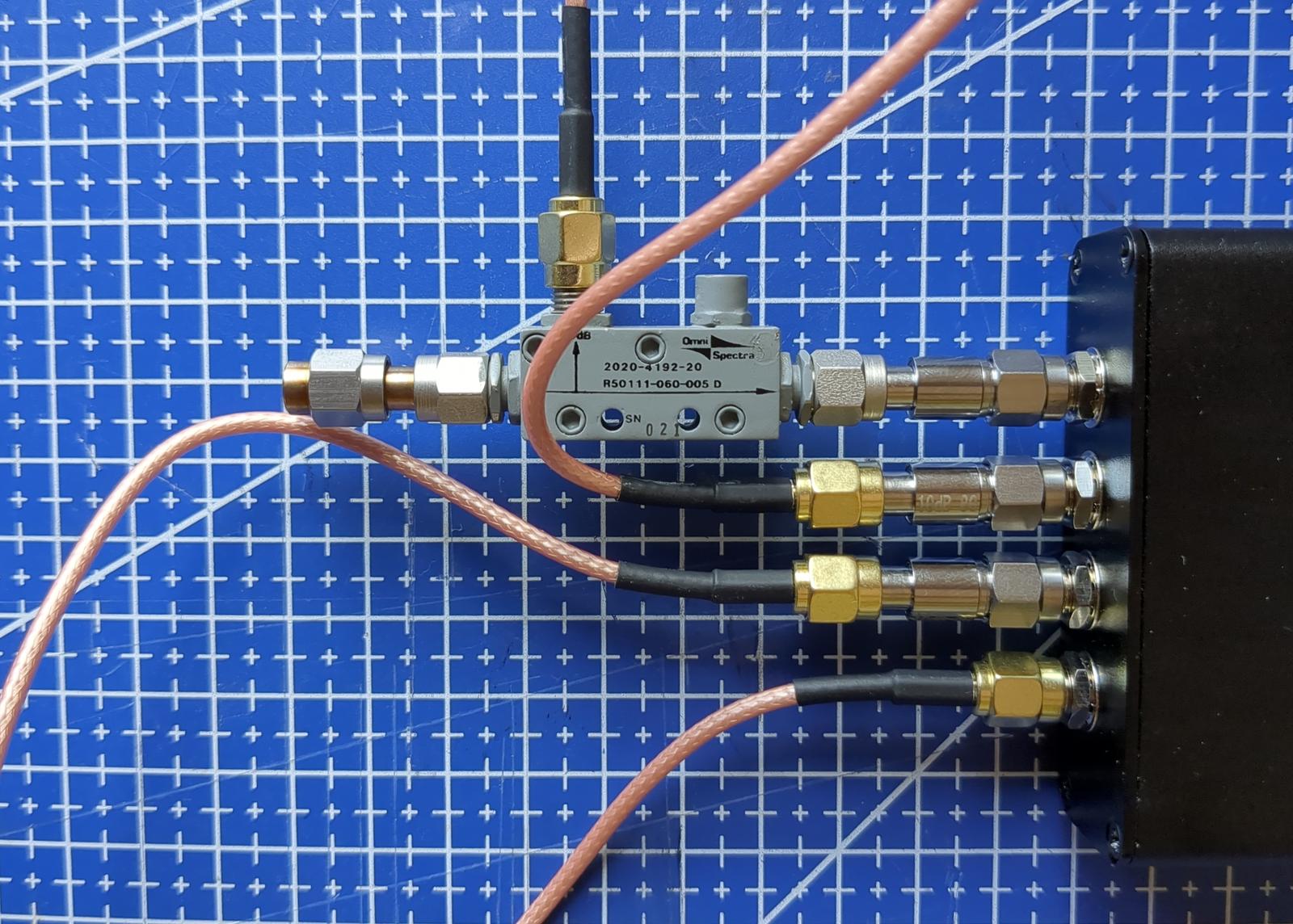
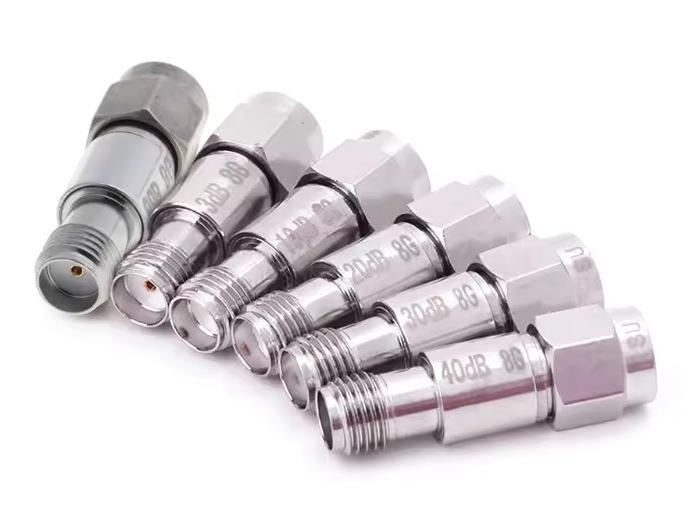
I bought 10 dB attenuators and SMA pigtails on AliExpress; there’s no need for fancy ones. I already owned the VNA calibration kit with the SMA barrel; it came with the NanoVNA-H. Why are attenuators needed? The first reason is that the signal from the transmitter has to be attenuated in order not to overload the receiver part. The second one is that a resistive attenuator pad presents a return loss of at least twice its attenuation value, regardless of what is connected on its far side (the reflected wave passes through the pad twice). A 10 dB pad with an open or a short behind it still shows about 20 dB of return loss. Placing one at each port masks the imperfect and frequency-dependent impedance of the transmitter/receiver behind a much more stable, close-to-50 Ω one. This reduces the source/load mismatch error in the measurement.
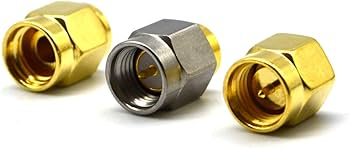
SMA cables/pigtails
A professional VNA should have high-quality test cables attached semi-permanently, since every mating wears the connector. Our setup is less sensitive, but good cables still help. I use the common AliExpress pigtails made of RG174, a thin cable, quite lossy at 2.4 GHz, though the calibration takes the loss into account. RG316 or RG402 semi-rigid, ideally surplus, would be a better choice.
Even more important than the quality of the cables (which can be offset by the calibration in some way) is tightening the SMA connectors properly. In my case, after tightening the multiple connections Pluto→attenuator→coupler with just my fingers, at least one joint tends to go loose. Professionals use a torque wrench, which is the best solution, but it is ultra expensive. SMA connectors are specified for about 0.56 Nm (brass) or 0.9 Nm (stainless steel), which is just a gentle snug. One could get away with an ordinary 8 mm (5/16”) wrench, carefully, without putting much force into it.
SATSAGEN software installation
The communication between the Pluto and the SATSAGEN application is done over TCP/IP. Even when connected over USB, the Pluto+ creates a virtual Ethernet interface. Although SATSAGEN is a Windows app, it works perfectly under Linux with Wine. No tweaking is required with Wine; it worked out of the box for me.
However, for SDRs other than Pluto, the author discusses some additional steps that are needed. I also noticed that, at least under Wine, you have to uninstall the previous version of SATSAGEN before installing a newer one. Otherwise, the installer crashes.
The versions I checked were SATSAGEN v.0.9.3.15 and later SATSAGEN v.0.9.4.2 - Patch 1. For completeness, I keep a copy of the installer I used here.
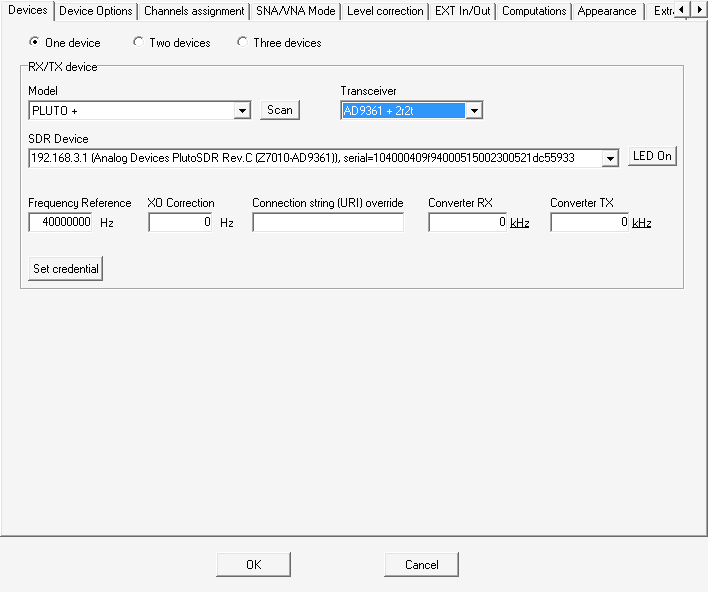
After opening the application, go to Settings→More Settings→Devices. Press the Scan button; the Pluto+ should be detected. Set the Transceiver option as in the screenshot, since we will be using two receivers and two transmitters:
After clicking Power and enabling Spectrum Analyzer, a chart should eventually show up. In my case it took several seconds until the device initialized. Then it should look like this:
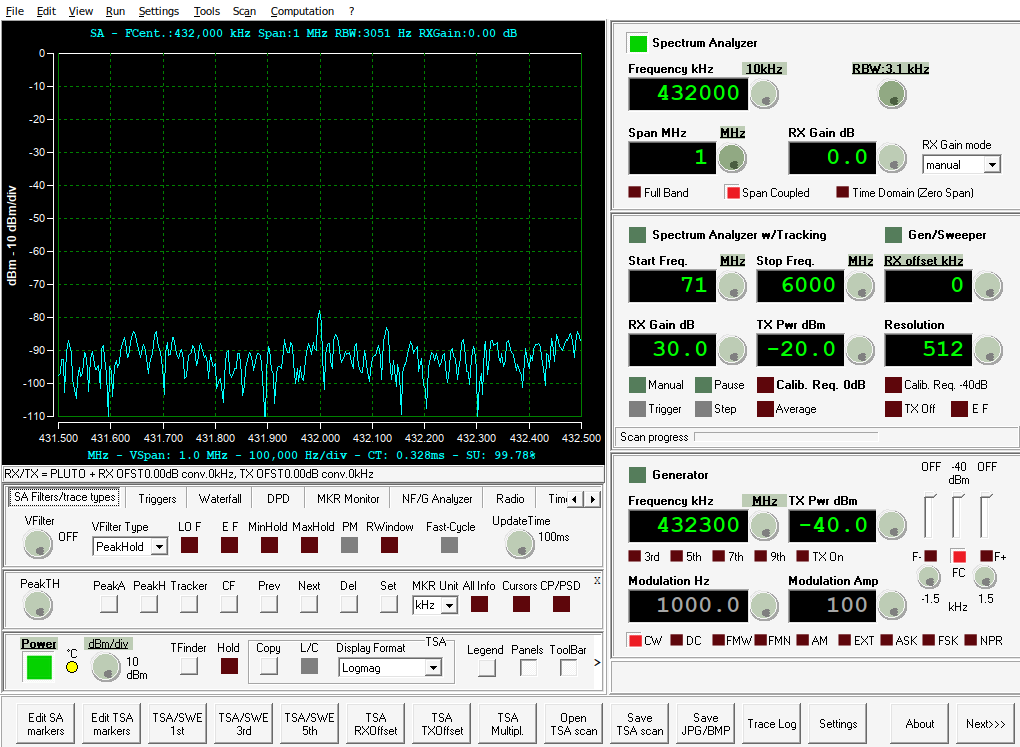
However, we’ll switch the mode from Spectrum Analyzer to VNA right away.
Analyzing one-port devices — S11
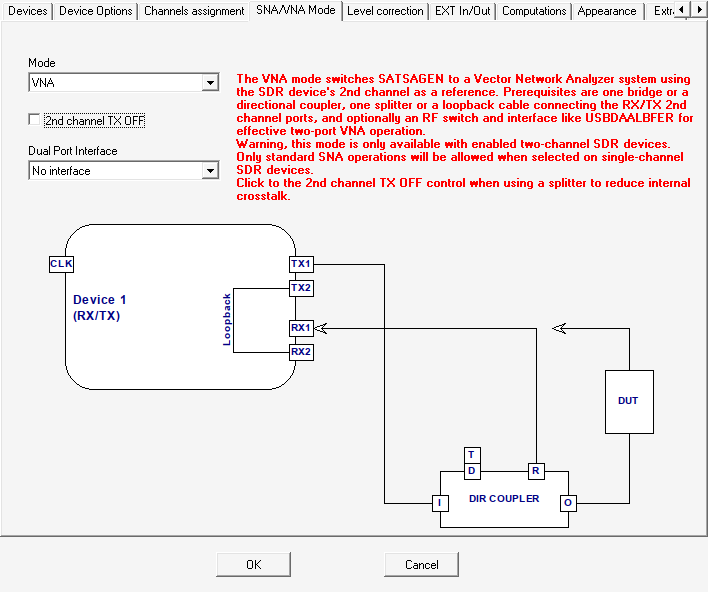
To switch the mode for S11 measurement (single SMA cable, things like antennas), go to Settings→More Settings→SNA/VNA Mode:
S11 measurement setup
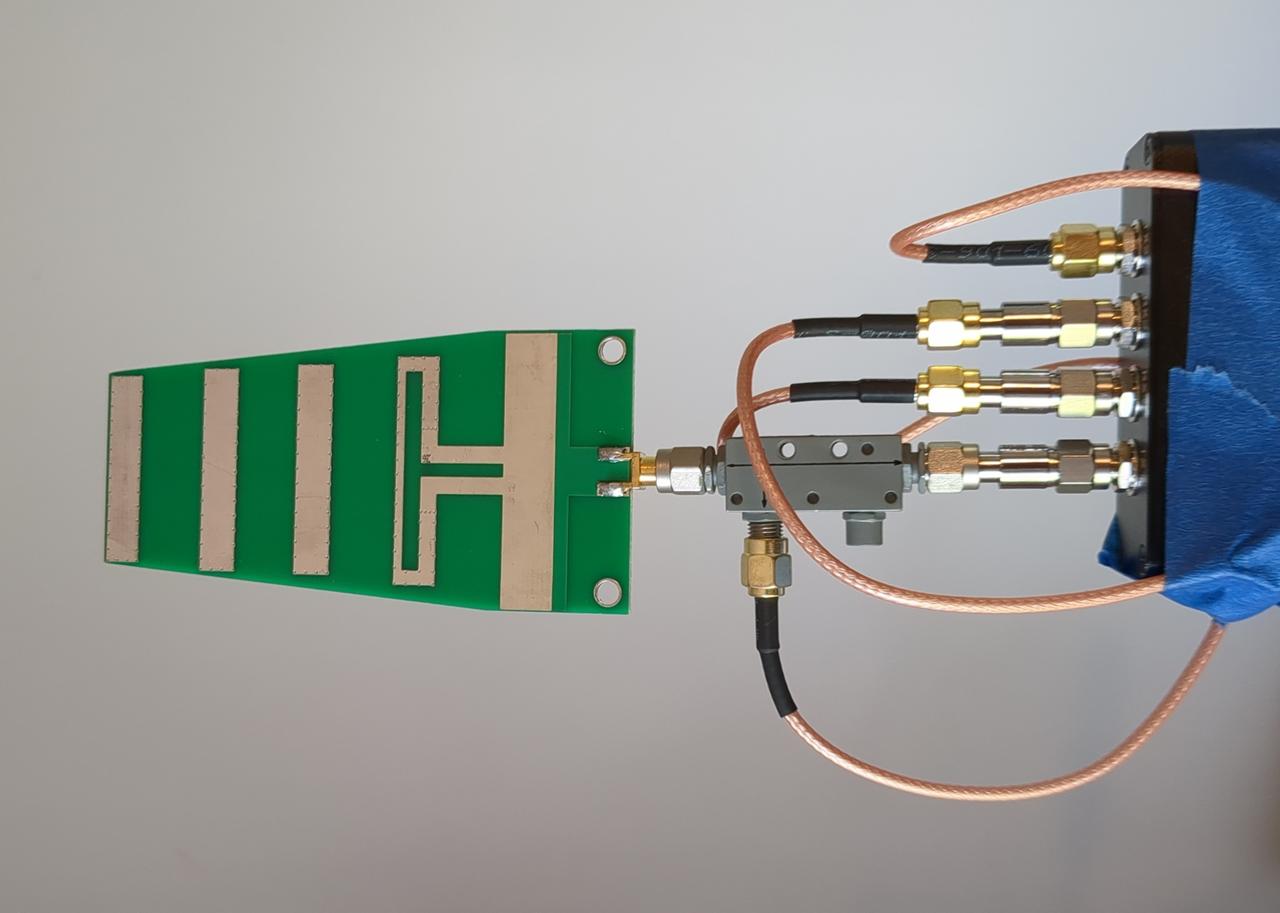
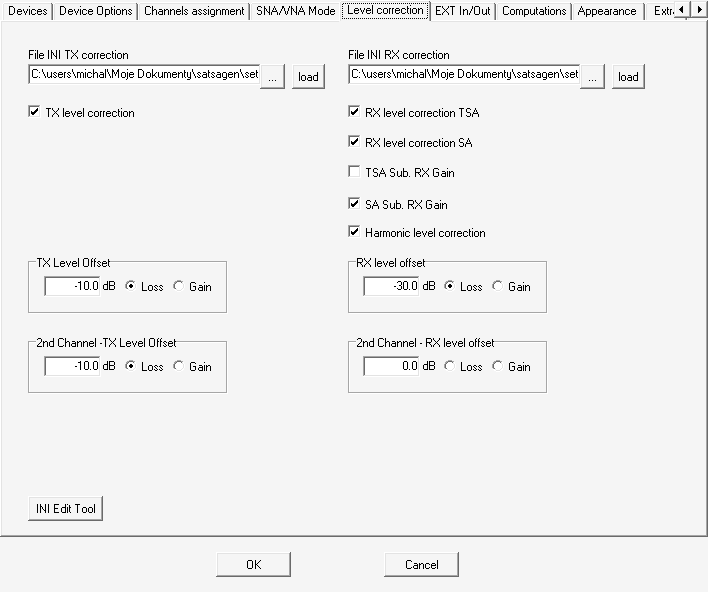
Next, configure the signal level offsets on the Level correction tab. This has to match the attenuators and the directional coupler used. In my case, with three 10 dB attenuators and a 20 dB coupler:
- TX level offset is -10 dB as there’s an attenuator at the output
- RX level offset is -30 dB because the coupler’s coupling factor is 20 dB and the signal then goes through a 10 dB attenuator to the input
- 2nd Channel - TX Level Offset is -10 dB because there is one attenuator in the loopback
- 2nd Channel - RX level offset is 0 dB — no additional attenuator
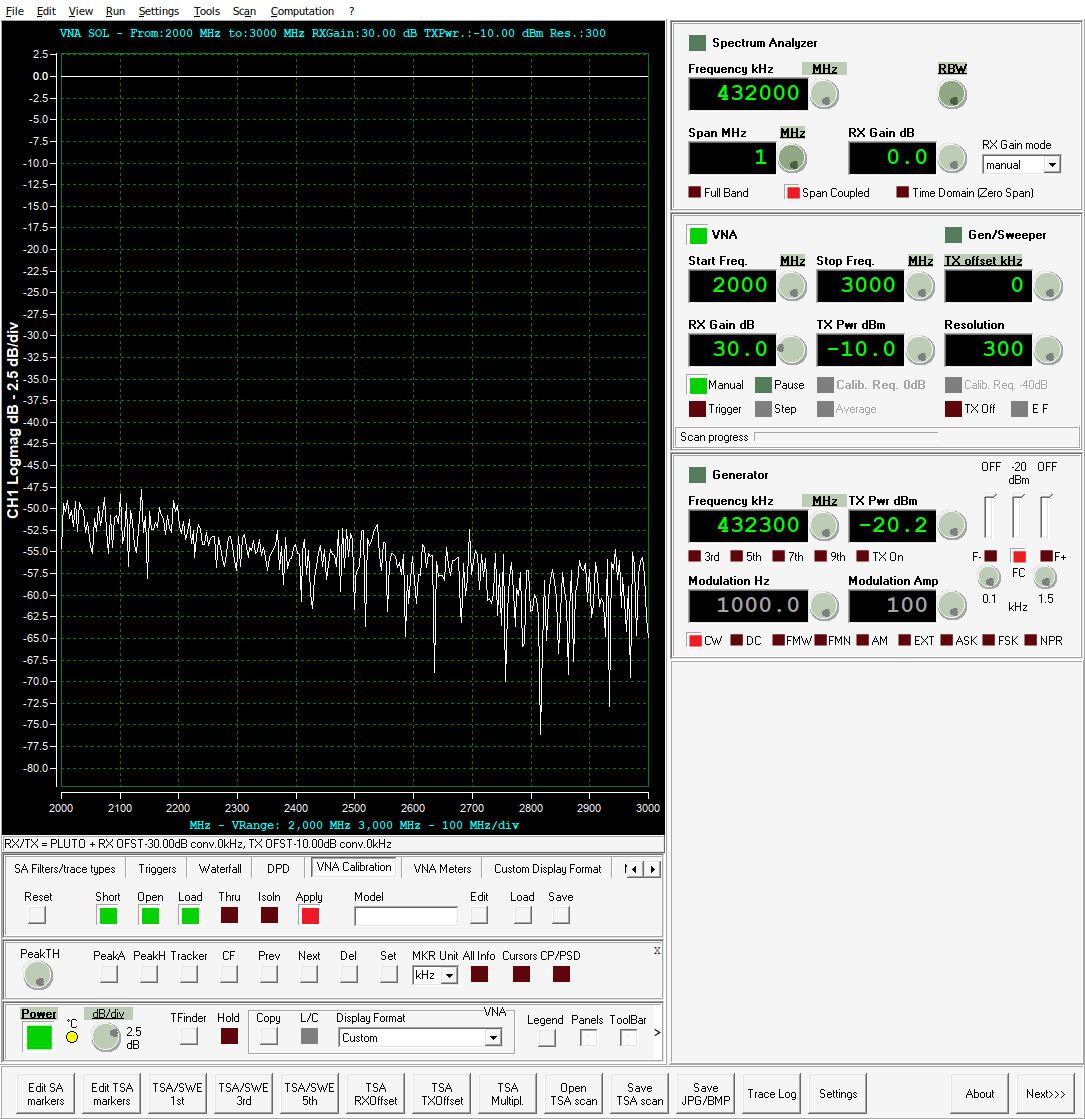
In the main window, the VNA panel should now be available on the right side (see the
screenshot below). Turn it on with a button press and set the frequency range. I increased the Resolution to 300. It is the
number of points into which the frequency range is divided. Going higher didn’t pay off for me: with 600 points the traces got a lot
noisier, while with 300 they looked fine. I don’t know if this is SATSAGEN’s bug though. I also increased the TX Pwr dBm to -10
dBm, as the chart is less noisy then.
In SATSAGEN’s nomenclature, the CH1 traces show the reflection (S11) and the CH2 traces show the transmission (S21).
Don’t confuse them with the 2nd Channel offsets in the settings; those refer to the TX2→RX2 loopback, which provides the
reference signal in both modes. The traces to display are chosen on the Custom Display Format tab below the chart. For antennas, I use CH1
Logmag and CH1 SWR.
Short-Open-Load (SOL) calibration
Before any measurement, the VNA must be calibrated, similarly to the NanoVNA. We attach the appropriate SMA calibrator to the coupler’s output
and in the VNA Calibration panel (just under the chart), we click the Open, Short and Load buttons in
turn. The calibrators go exactly where the DUT will be connected later. If the antenna is to be measured through a cable, the calibrators are screwed onto
the far end of that cable:
- Open — the open calibrator is screwed on. The whole signal is reflected back in phase; this gives SATSAGEN the 0 dB, 0° reference of the reflection.
- Short — the short calibrator. The signal is also fully reflected, but with the opposite phase (180°). Together with the open, it lets the software determine the frequency response and the phase shift of the whole path.
- Load — the 50 Ω load. Ideally, nothing is reflected, so whatever the receiver still sees is the leakage through the coupler (its finite directivity) and the mismatches of the connectors. It is subtracted from the subsequent measurements.
Before clicking each button, tighten the calibrator properly and let the trace settle for at least one full sweep. Remember to click Apply
after going through all calibrators! The calibration results are valid for the given frequency range and resolution. They can also be saved to and loaded
from a file.
The screenshot shows the LOGMAG chart for the 50 Ω calibration dummy load. The peak between 2 and 3 GHz is -47 dB, which is probably about as much dynamic range as is achievable with the setup (10 dB attenuators and 20 dB coupler). For S21, there’s no coupler, so the dynamic range can increase to >= 60 dB.
People claim the dynamic range of the Pluto+ VNA is 60 to even 80 dB; I can’t verify that, but for antenna tuning it is more than enough.
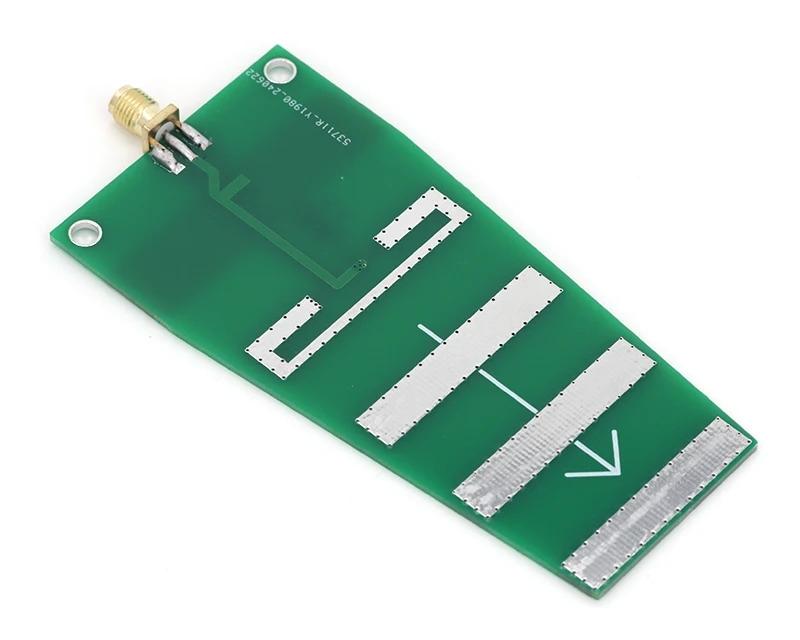
2.4 GHz Yagi PCB antenna from AliExpress
It is available on AliExpress for about 3 EUR. The claimed parameters are:
- working frequency: 2.35 – 2.55 GHz
- gain: 10.5 dBi
- SWR: <2
- max power: 10 W
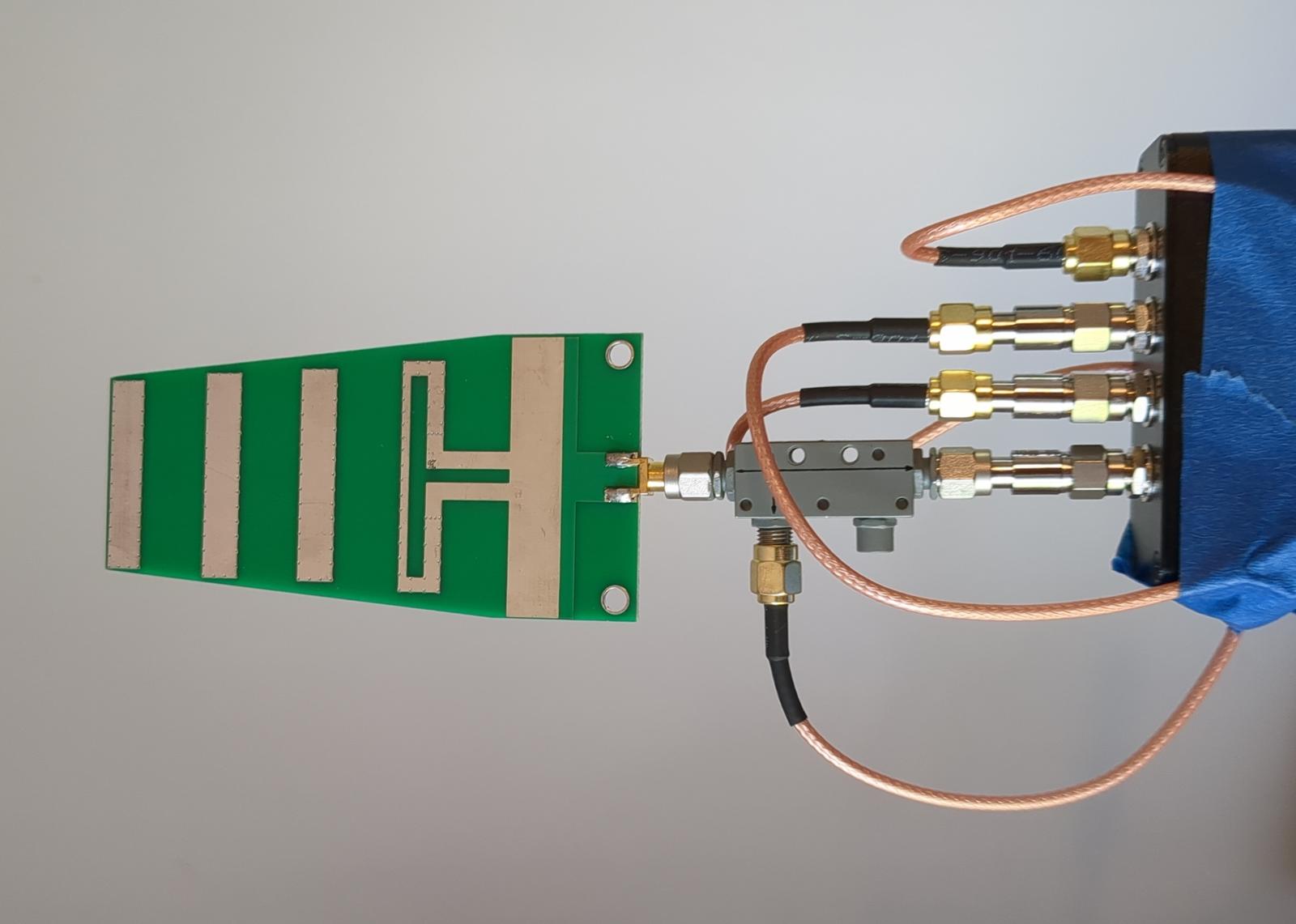
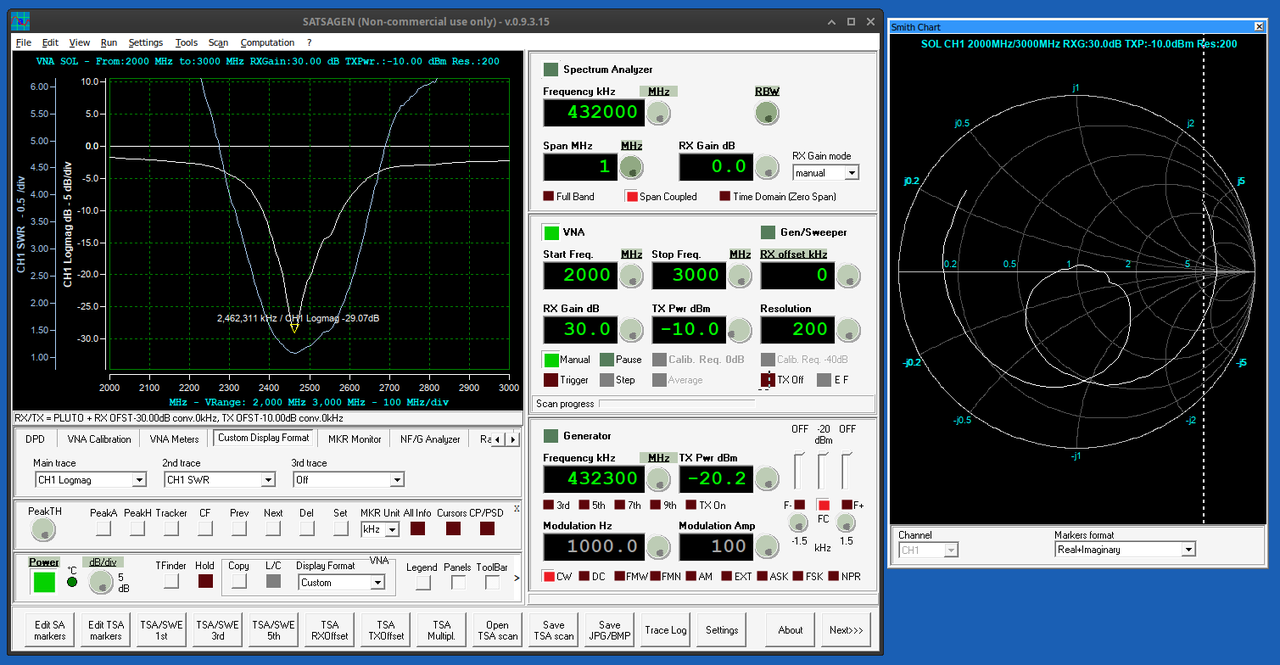
The resonance sits at 2462 MHz with a return loss of about 29 dB. The SWR stays below 2 (return loss better than 9.5 dB) roughly from 2330 to 2590 MHz, so the seller’s claims are met. The bandwidth is narrower than that of the helix, as expected from a Yagi antenna, but it covers both the Wi-Fi band and the QO-100 uplink. However, as a dish feed for QO-100, a circularly polarized helix antenna is a better choice.
The antenna radiates, so the surroundings take part in the measurement. It is worth keeping it away from Wi-Fi routers and Bluetooth devices, as their transmissions show up as spikes on the chart. Also, the objects around the antenna detune it, as the two charts below show. This is the antenna far from any obstacles, measured on another occasion with resolution 300, so the dip of about -27 dB differs slightly from the -29 dB above:
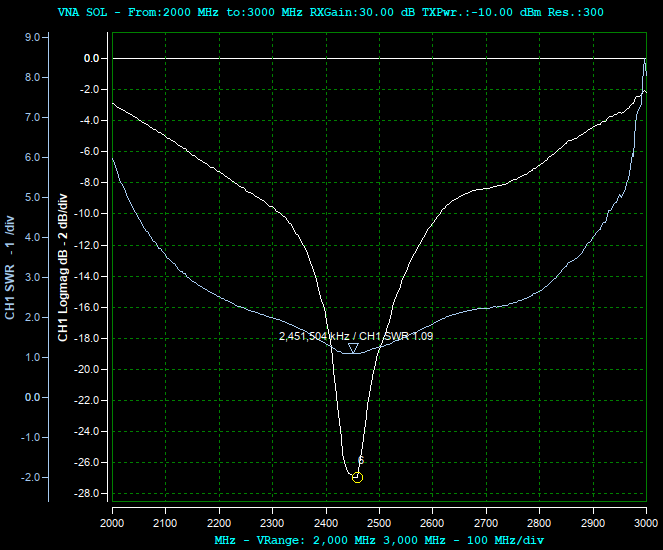
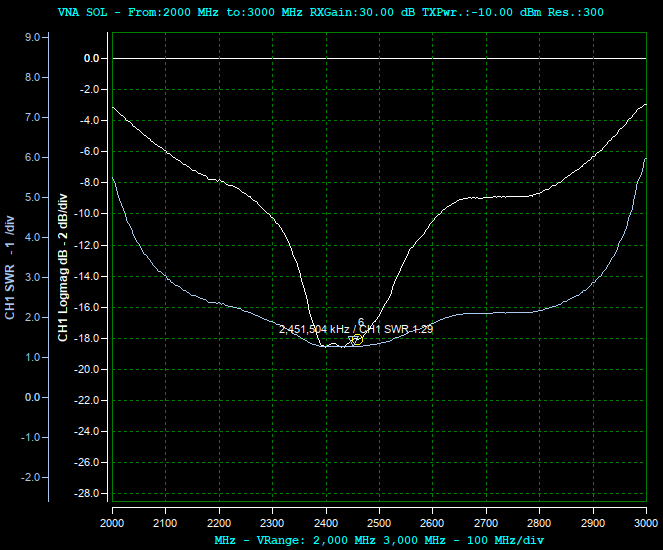
After laying the antenna on the chipboard desk, which is an obstacle itself, the dip gets shallower and wider: from about -27 dB up to only -18.5 dB, and the SWR at 2451 MHz goes up from 1.09 to 1.29. It’s still a perfectly usable antenna, but antennas should always be measured in the position they will be working in, or at least far from any obstacles.
With the antenna screwed directly onto the coupler, the trace is a smooth single dip as shown in the first chart. After inserting a 13.5 cm SMA pigtail between the coupler and the antenna, two extra humps show up at 2180 MHz and 2800 MHz, even though the antenna’s resonant frequency barely moved:
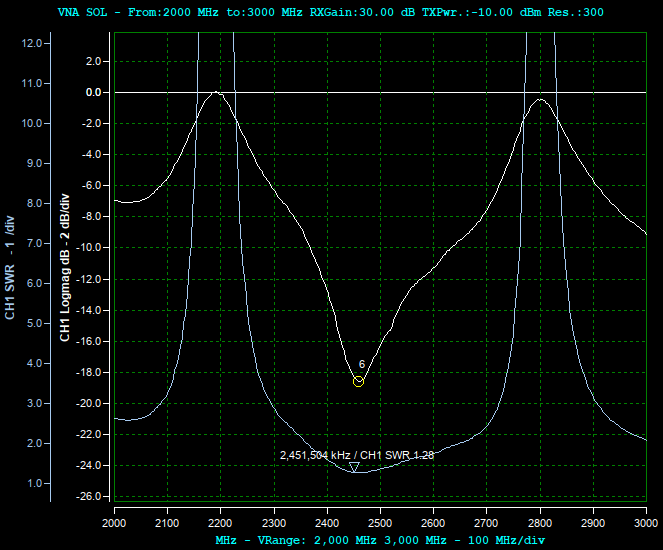
The pigtail itself causes those humps; see the section on feedline ripple.
2.4 GHz helix antenna for QO-100
I recreated a popular helix antenna design by DC8PAT, suitable for mounting on a satellite dish for QO-100:
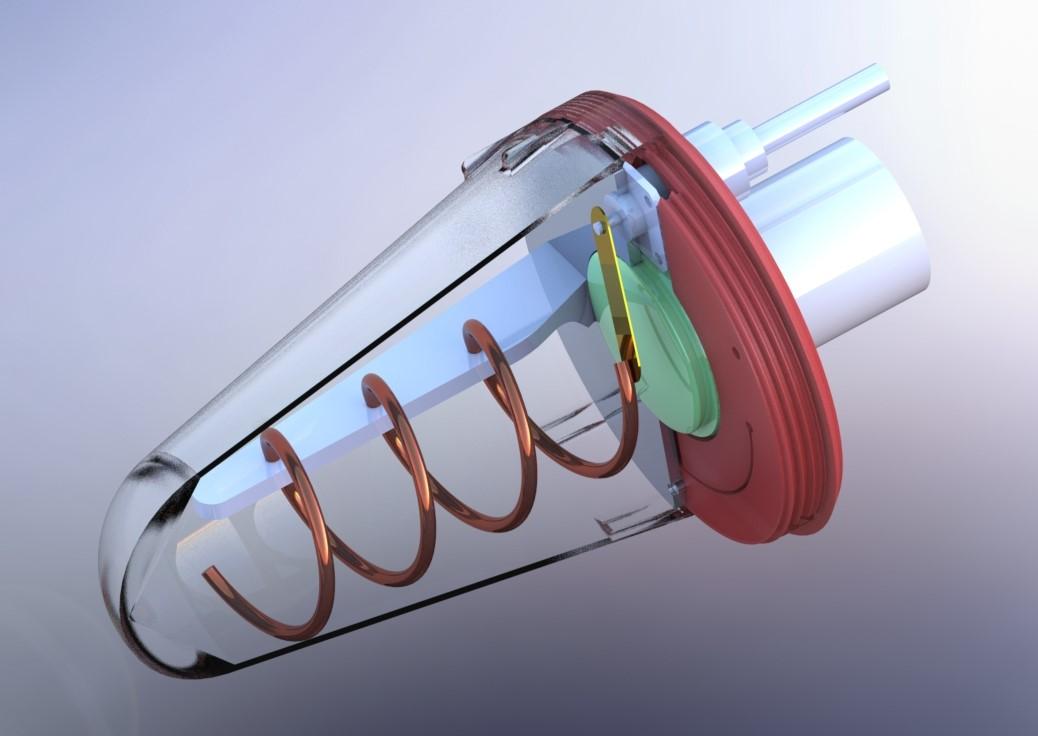
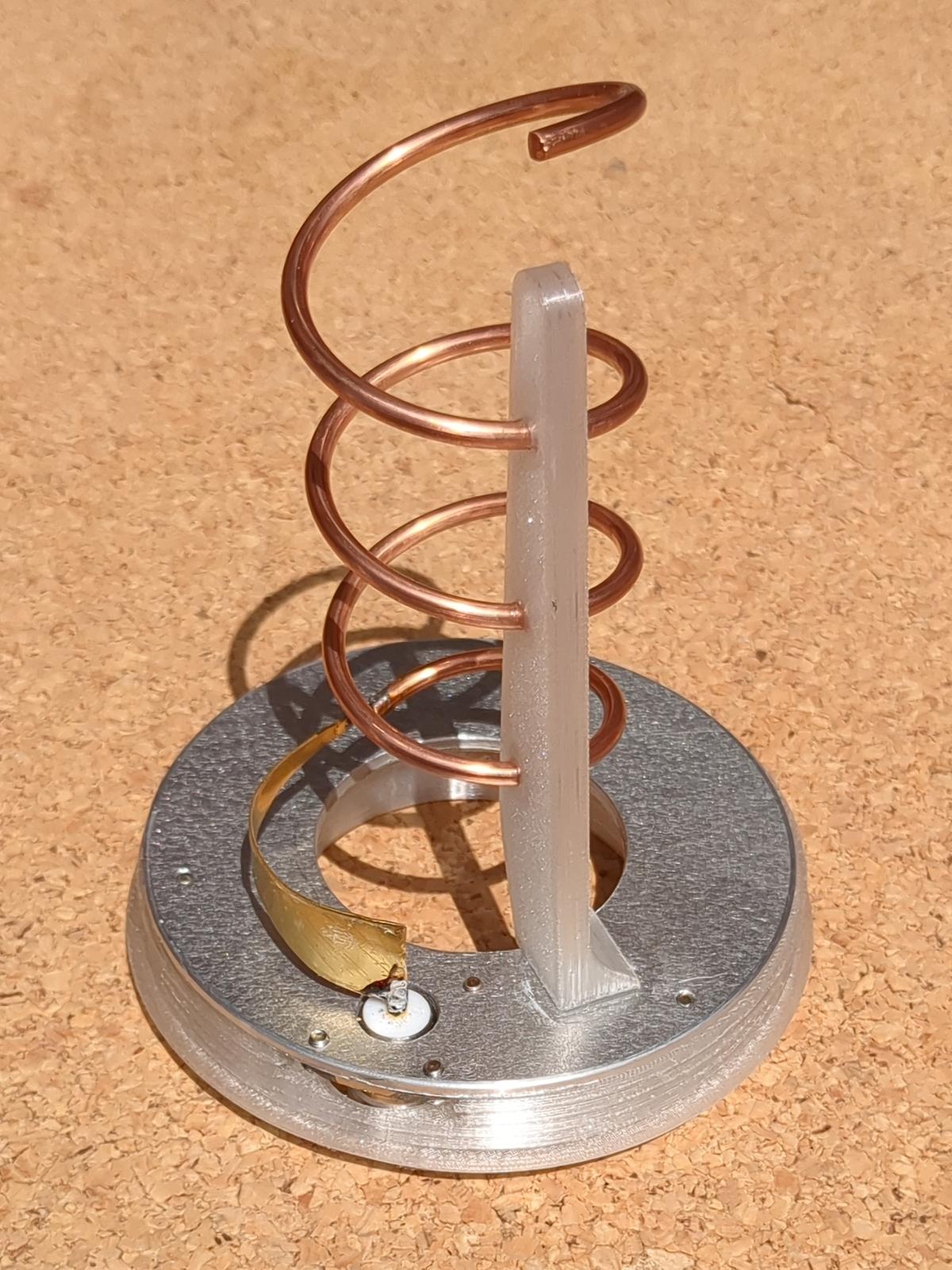
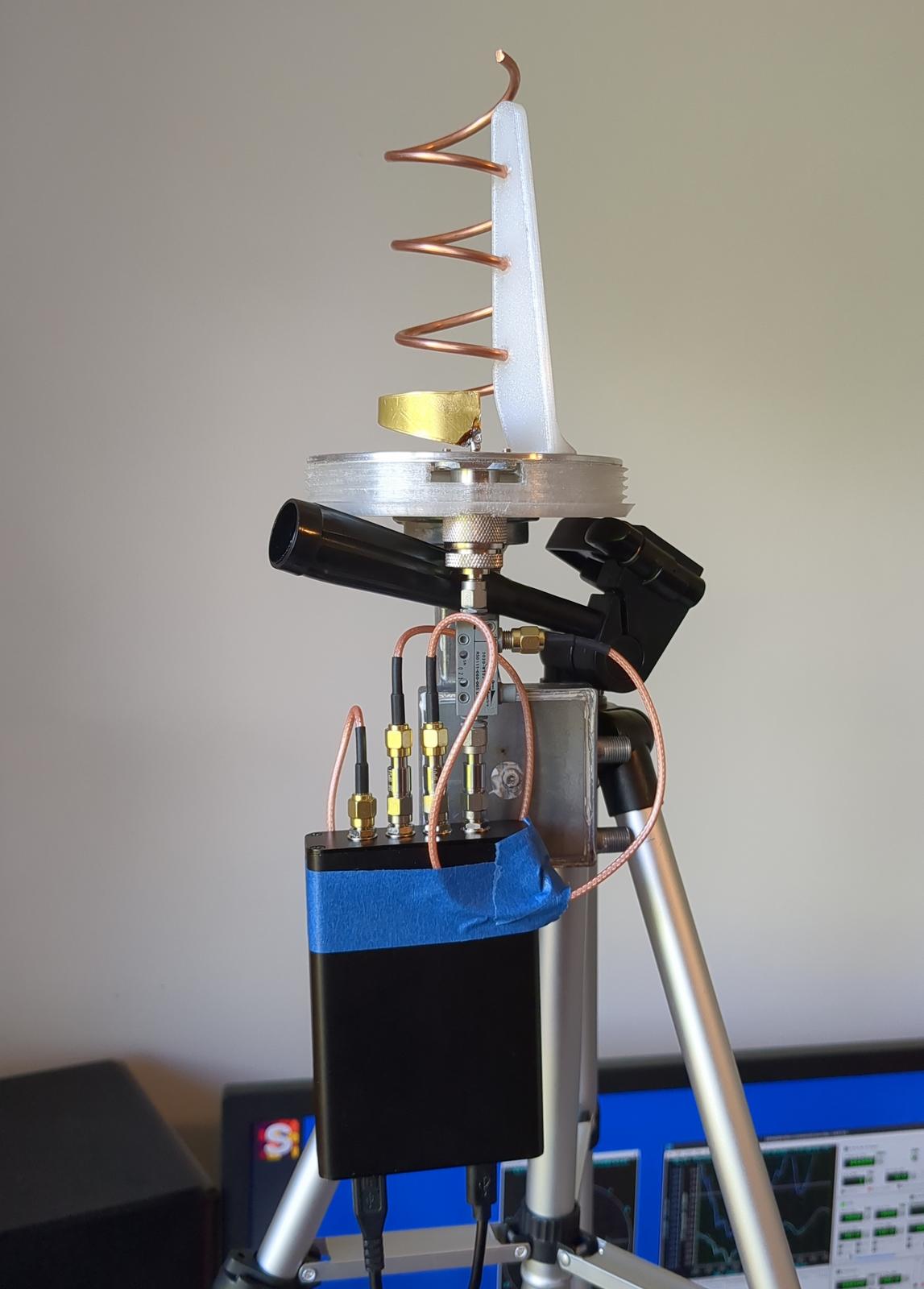
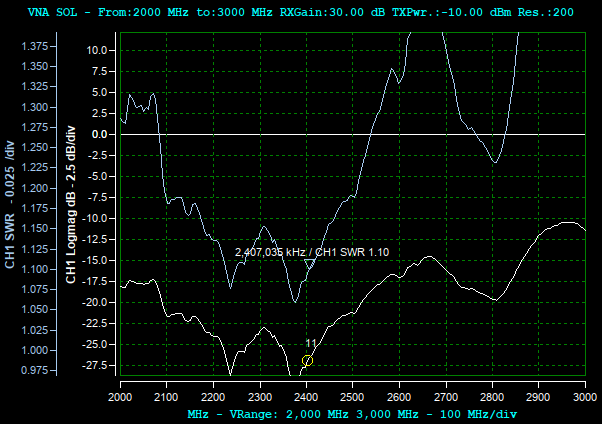
To tune the helix, the official manual suggests changing the distance between the lower part of the matching vane and the reflector, but that made almost no difference in my case. More effective was stretching and squeezing the coil a bit, especially the lower part. That makes sense, since the feed impedance depends mostly on the height of the first quarter-turn above the reflector. Squeezing the bottom of the coil changes it directly, which is what the vane adjustment is supposed to do as well. I didn’t manage to get the SWR lower than 1.08 (at about 2370 MHz), with 1.10 at the QO-100 uplink, but this is perfectly OK.
The screenshot below shows the SWR and LOGMAG charts. Taking SWR <= 1.2 (which is more than enough) as the criterion, the antenna works from about 2.1 GHz up to 2.5 GHz. The QO-100 uplink (2400 – 2410 MHz) sits comfortably inside. Helix antennas are more wideband than Yagi antennas: with the same SWR <= 1.2 criterion, the Yagi covers only about 180 MHz (2380 – 2560 MHz), while the helix covers about 400 MHz.
Unfortunately, after mounting the helix on a dish, the SWR jumped to 2.0. I needed to redo the tuning; after some fiddling I achieved an SWR of 1.34, which is also OK:
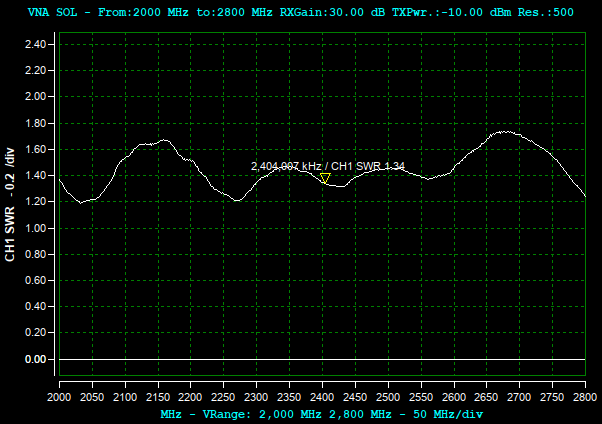
The helix was connected directly to the coupler, without any cable, yet the SWR chart is wavy with a period of about 260 MHz, with peaks at about 2160 and 2680 MHz, dips at about 2030 and 2270 MHz. Between them, around 2.4 GHz, there is no peak but a plateau at SWR ≈ 1.3 – 1.45. The culprit is the dish itself. A part of the wave radiated by the feed is reflected by the dish back into the feed, delayed by the round trip. Using the same reasoning as for the feedline, the 260 MHz period corresponds to a reflector about 1.9 ns away, which is some 55 – 60 cm in the air, roughly the focal length of the dish. This is also why the SWR jumped after mounting and why a feed should always be tuned on the dish it will be working with.
The size of the ripple depends on how strong the antenna’s own reflection is compared to the echo from the dish. Outside the band, the antenna is poorly matched and the two reflections alternately add up and cancel out, giving the big peaks and dips. Around 2.4 GHz, where the antenna is well-matched, the echo is left alone, so there’s nothing to interfere with.
After the dish was installed for good, I repeated the measurement from the shack end of the feedline: roughly 3.5 m of MRC400 coax (an LMR-400 equivalent with foam dielectric). The SWR stays between about 1.1 and 1.35 across the 2.3 – 2.45 GHz band, which is good, but more ripple appeared:
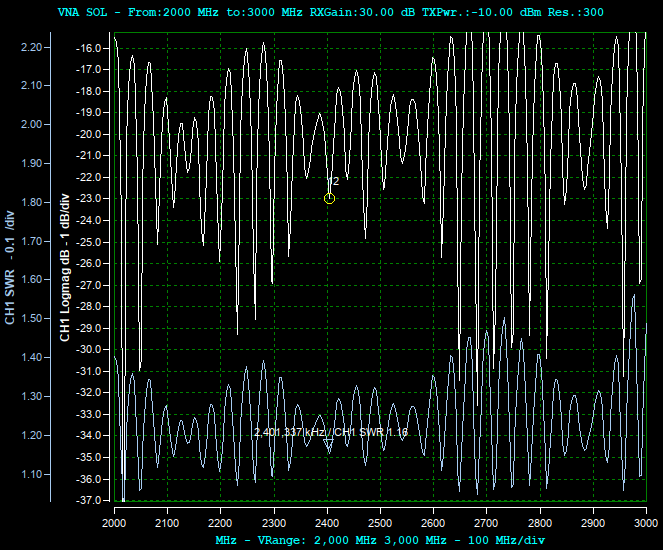
Two ripples are superimposed here: the dense one, with a period of about 33 MHz, is the signature of the feedline (explained below), while its depth follows the slow wave of the dish echo shown above.
Notice also that the SWR at the uplink frequency reads 1.16 through the feedline, while directly at the antenna it was 1.34. The antenna didn’t improve; the cable just makes it look better, partly by its loss, partly by where 2401 MHz happens to fall on the ripple.
Ripple in the charts caused by the feedline
Both antennas, the Yagi and the helix, showed the same effect: as soon as I inserted a piece of coax between the coupler and the antenna, the trace got wavy. The ripple is an artifact of measuring past the calibration plane.
The SOL calibration sets the measurement plane at the coupler’s output connector. Everything attached beyond that point is, from the VNA’s point of view, a part of the device under test, the cable included. The instrument then sums up two reflections it has no way of telling apart:
- the reflection near the calibration plane — the mismatch of the connectors and adapters at the cable’s input, the fact that the cable is not exactly 50 Ω, plus whatever error the calibration has not removed,
- the antenna’s own reflection, which comes back delayed by the round trip along the cable.
The phase difference between the two grows linearly with frequency, so they alternately reinforce and cancel each other. The result is a ripple whose period depends only on the length of the cable:
where c is the speed of light, VF is the cable’s velocity factor (about 0.66 for solid-polyethylene coax, about 0.85 for the foam-dielectric ones) and L is the cable length. The factor of 2 is there because the wave travels along the cable twice. The formula matches both antennas measured above:
| Cable between coupler and antenna | Predicted Δf | What the chart shows |
|---|---|---|
| none | — | no ripple at all |
| 13.5 cm pigtail | ~730 MHz | humps ~620 MHz apart |
| ~3.5 m of MRC400 to the dish | ~36 MHz | ~33 MHz |
In both cases, the measured spacing is smaller than predicted, because the connectors and adapters add their own electrical length to the cable. Going backwards, 33 MHz corresponds to a round trip of about 30 ns, that is about 3.8 m of MRC400. The connectors, the N-to-SMA adapters and the jumpers at both ends of the feedline make up the remaining 30 cm. By the way, this is a handy way of checking the length of a cable which is already installed: the 5 m variant would give a ripple period of only 25 MHz.
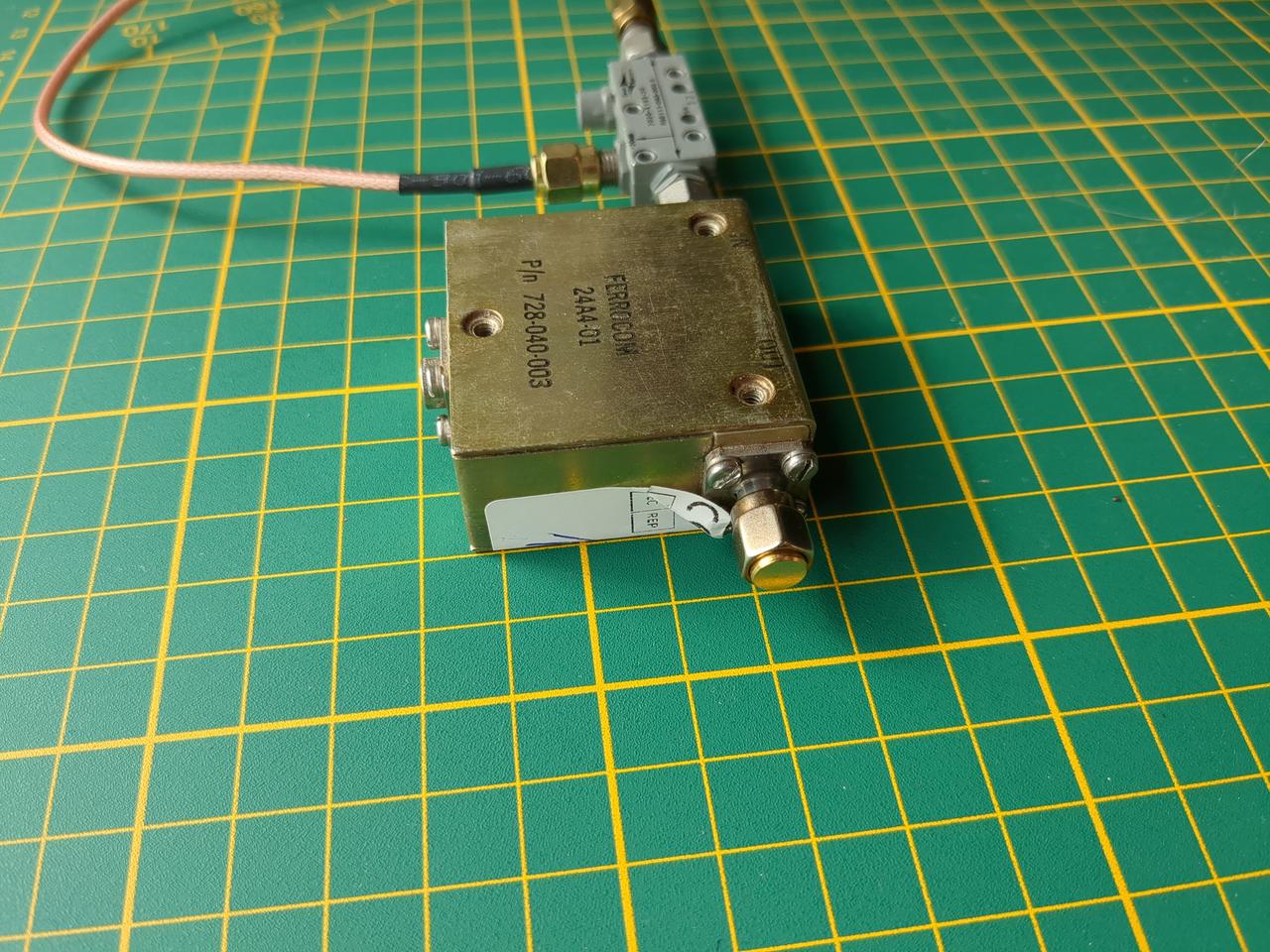
FERROCOM isolator
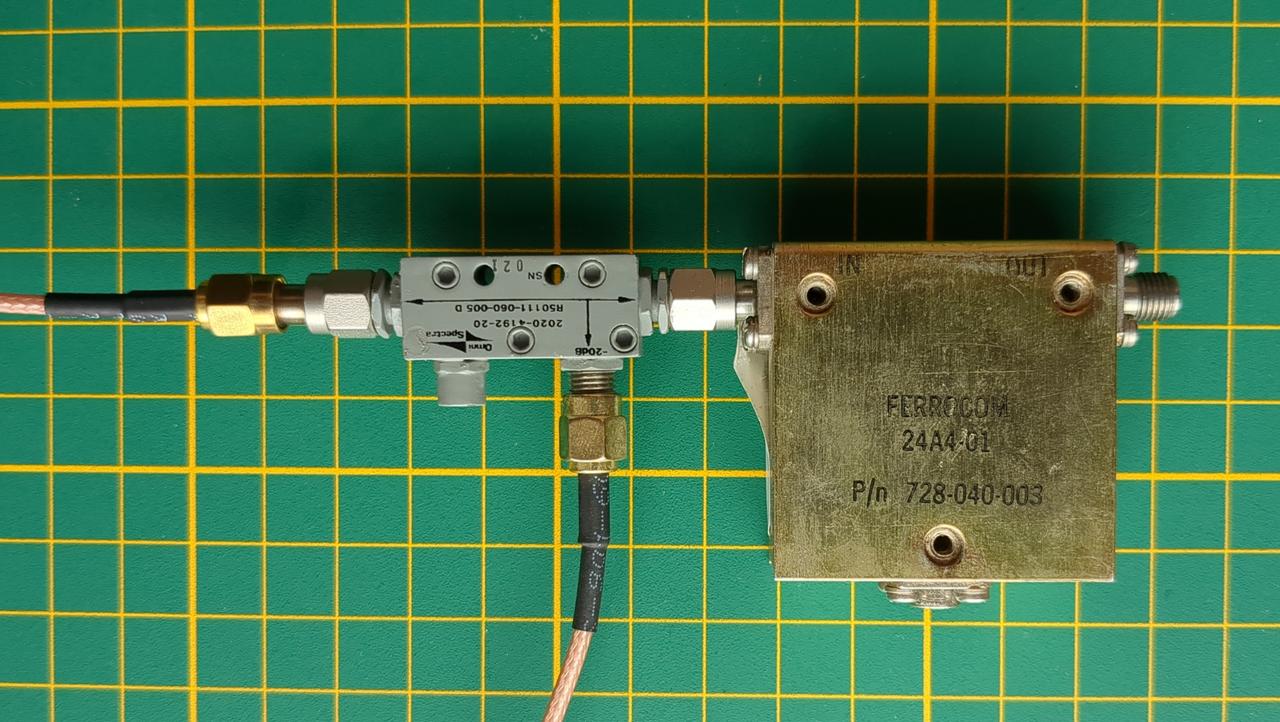
An RF isolator is an exotic microwave component which passes RF energy in one direction only, while the backward direction is heavily attenuated. It is closely related to a circulator: a three-port device passing the energy from port 1 to 2, from 2 to 3 and from 3 to 1. An isolator is essentially a circulator with its third port terminated with a load, which absorbs the reflected power. It’s commonly placed between a transmitter and an antenna to protect the amplifier from reflected power. I bought a surplus FERROCOM isolator, suitable for 1.95 – 4.05 GHz, as the seller claimed. I planned to experiment with it a little and then maybe put it into my QO-100 transmitter. The markings on the isolator:
FERROCOM
24A4-01
P/n 728-040-003
Here it is measured from the IN side, so SATSAGEN sees its S11, not its forward insertion loss. Because the isolator
decouples the input from the output, that S11 should stay close to the isolator’s own input match no matter what is connected to OUT. The
isolator is fed through the Omni Spectra coupler, and what changes between the measurements below is only what is screwed onto its OUT port:
an open port, a 50 Ω load, the Yagi antenna and a short: four wildly different loads.
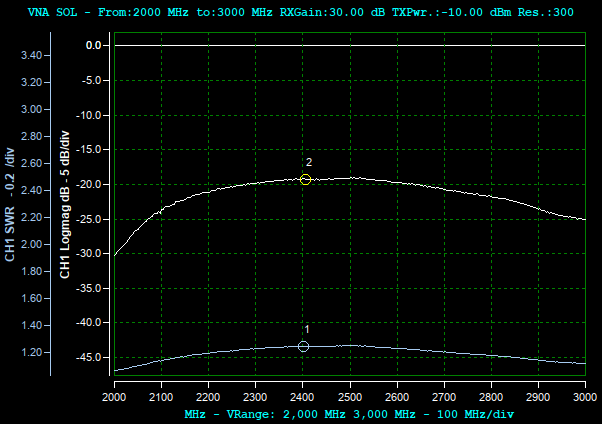
Nothing connected to the output
A 50 Ω dummy load
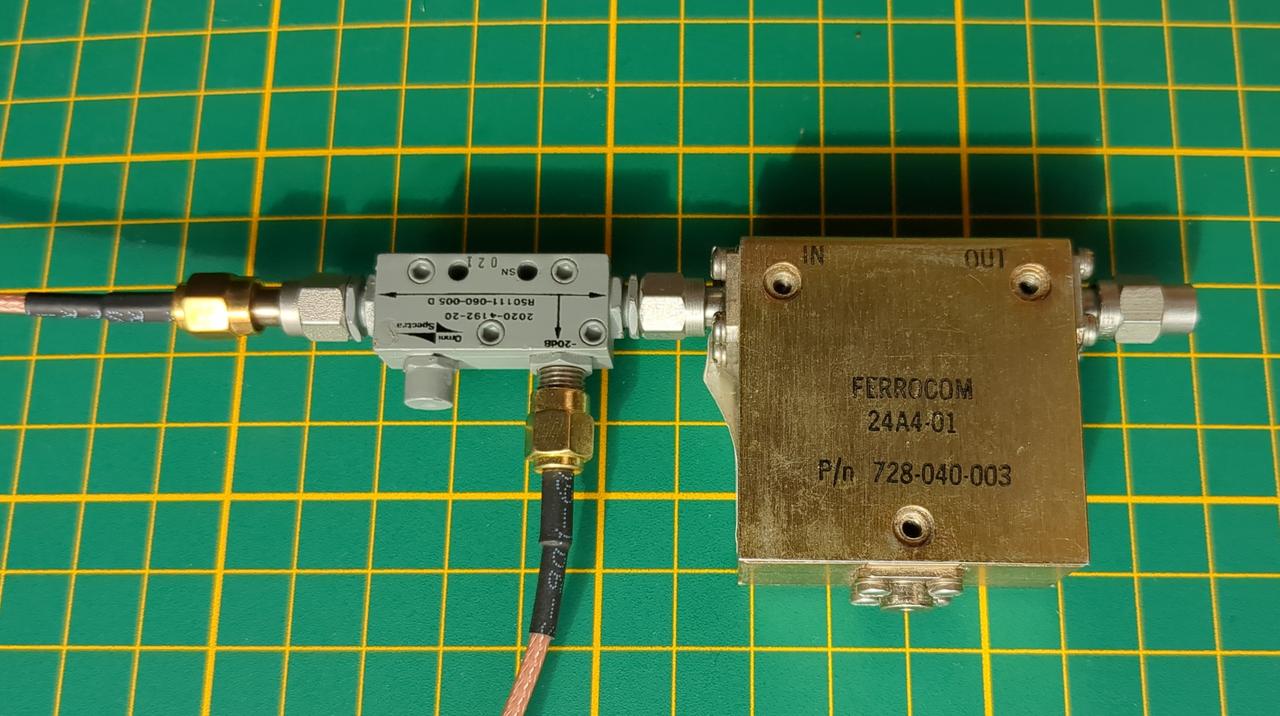
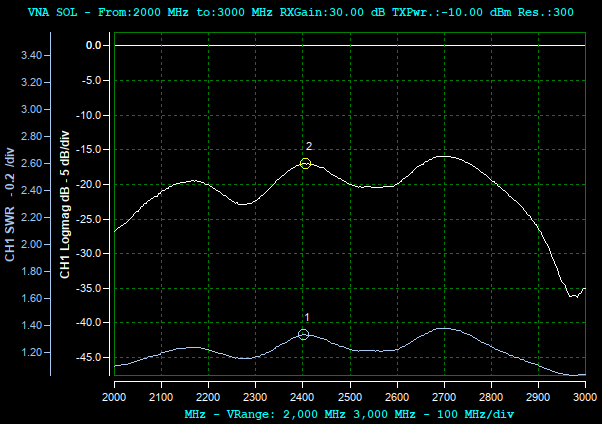
The Yagi antenna
A short
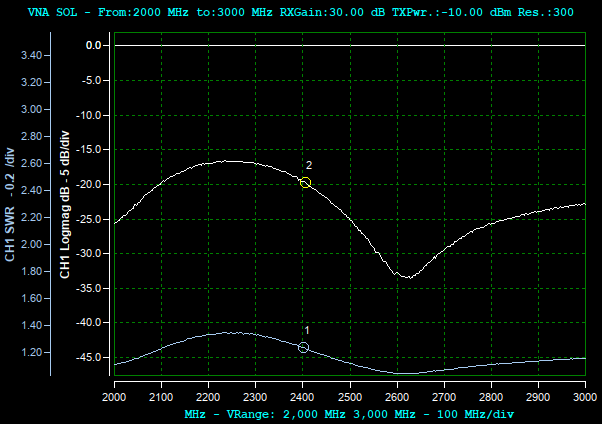
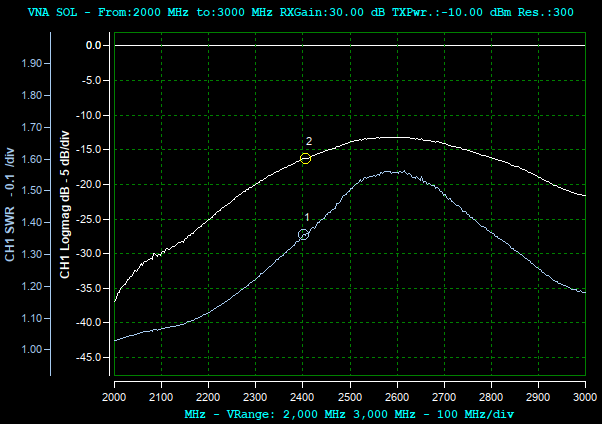
With a 50 Ω load on the output, the return loss is about 19 – 20 dB (SWR ≈ 1.25) and almost flat between 2.3 and 2.7 GHz. This is the isolator’s own input match.
In an ideal isolator, the other three charts would look exactly the same. They don’t: at 2.4 GHz the return loss wanders between about 16 and 20 dB, and
with the short, a deep notch down to -34 dB appears around 2620 MHz. The culprit is the finite isolation: the wave reflected from OUT returns
through the isolator attenuated by about 19 dB (measured below), which is comparable
to the isolator’s own input reflection. Depending on the phase, the two add up or cancel, hence the different shapes for the open and the short, and the
notch at 2620 MHz. The Yagi chart shows humps about 260 MHz apart, which is neither the antenna’s own response nor the isolator’s delay. It might be an
echo from some object about 57 cm away, as with the helix on the dish.
So the real isolator doesn’t hide the load completely. Even with an open or a short at the output, the measured return loss in the 2.4 GHz band doesn’t get worse than about 16 dB (SWR ≈ 1.4), which is still very good for the amplifier.
Checking two-port devices — S21
The transmission coefficient tells how much of the signal passes through the device: the insertion loss of filters and attenuators, the gain of
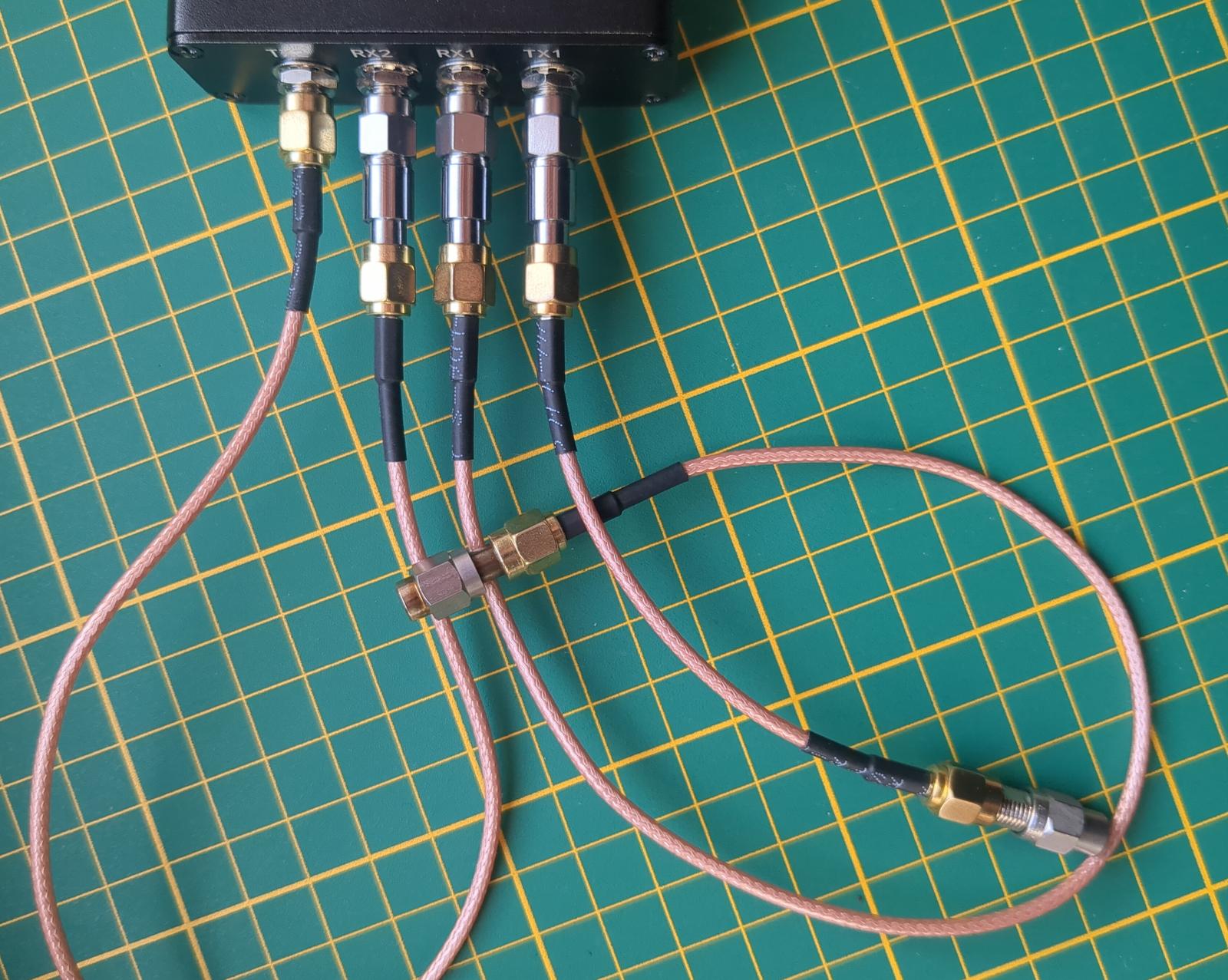
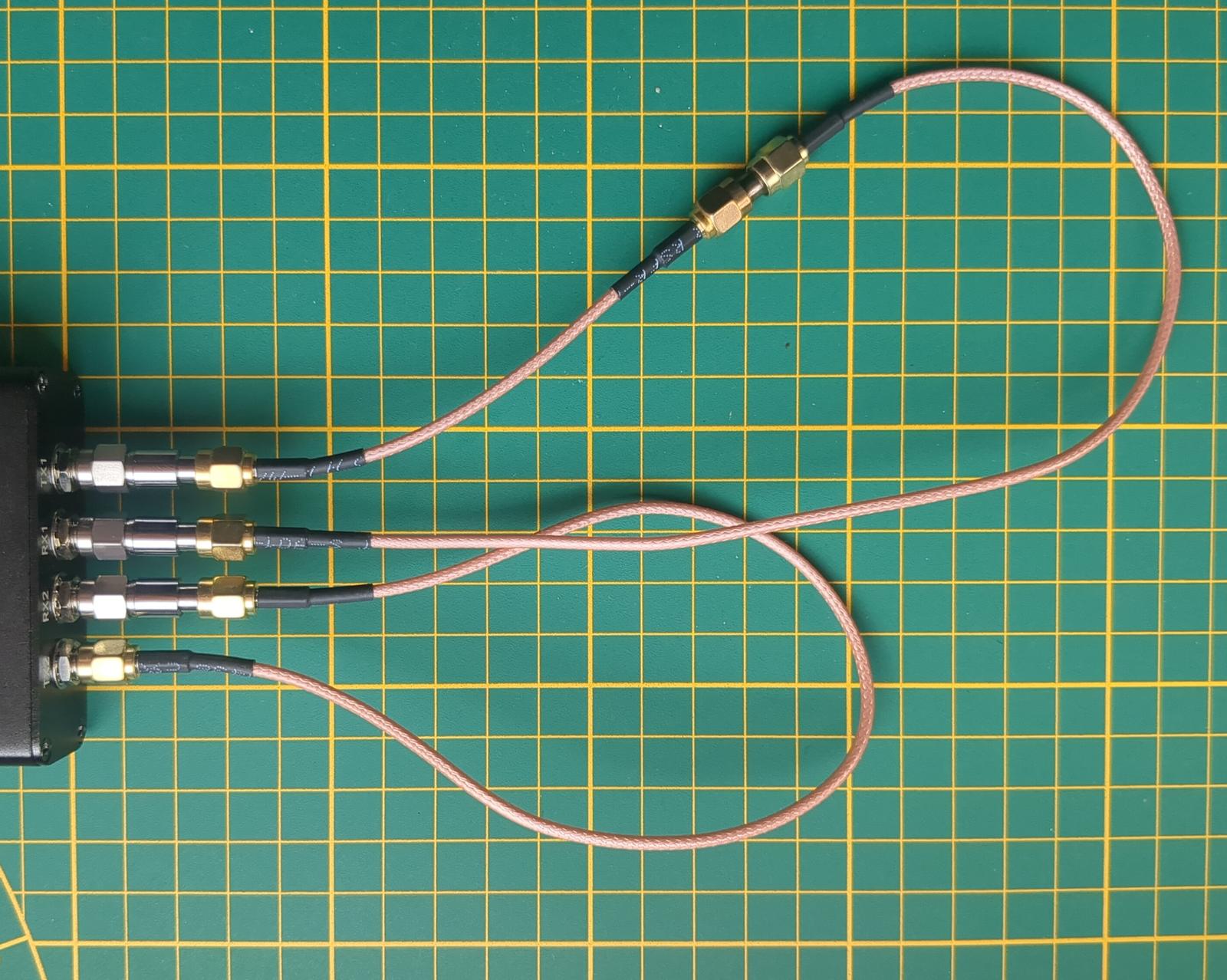
amplifiers, the isolation of isolators. The setup is simpler than for S11, since no coupler is needed. The DUT is placed between the TX1 and
RX1 ports, each of them with its own 10 dB attenuator. The TX2→RX2 loopback stays in place; it provides the
reference signal. The mode in the SNA/VNA Mode settings stays VNA; only the wiring is different:
S21 measurement setup
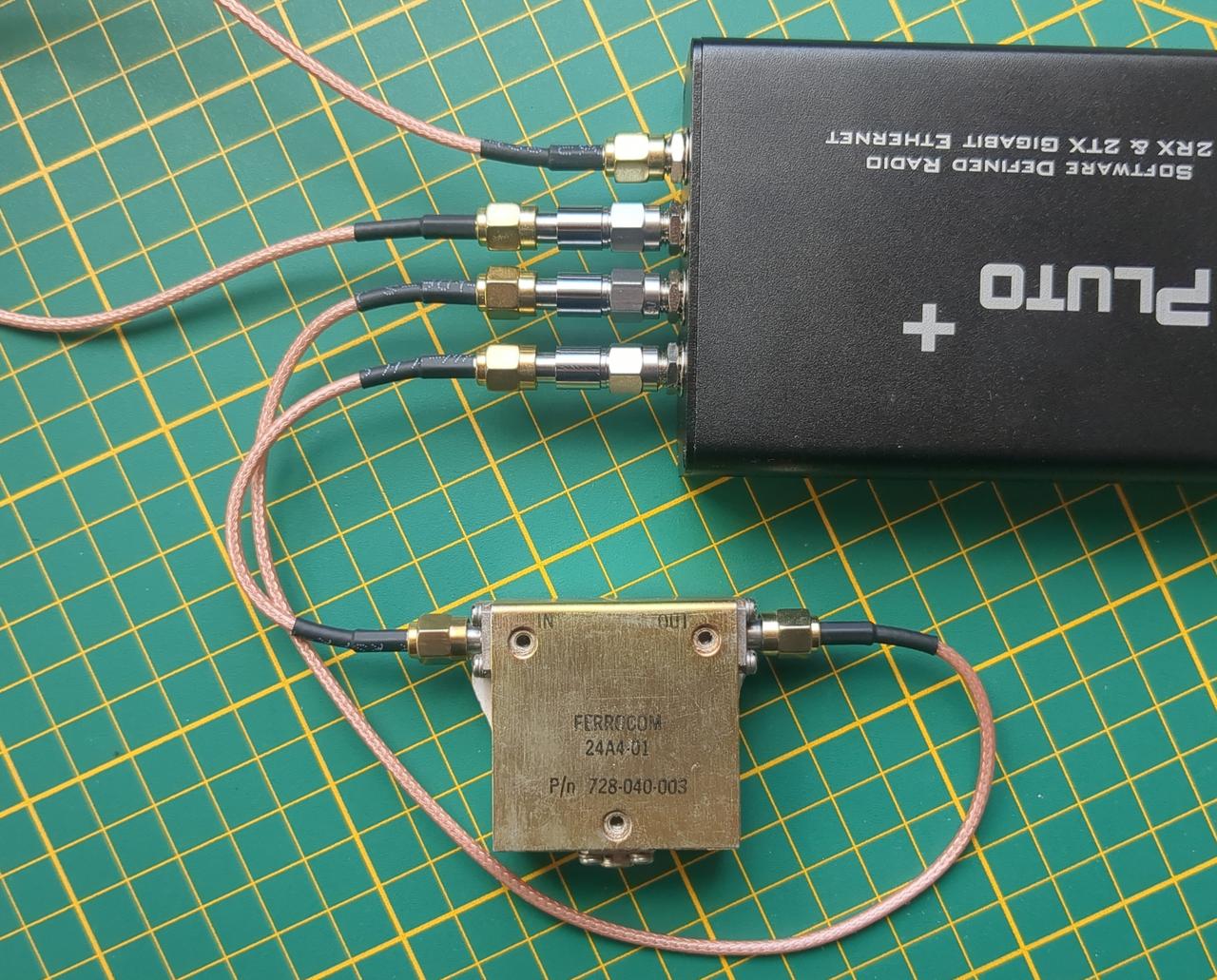
The level offsets on the Level correction tab have to be adjusted, though. The 20 dB coupler is gone, so the RX level offset goes back to -10 dB. The 2nd Channel offsets are 0 dB for TX and -10 dB for RX. It doesn’t matter whether you swap TX and RX offsets. What matters is that the sum matches the attenuation physically present in the loopback.
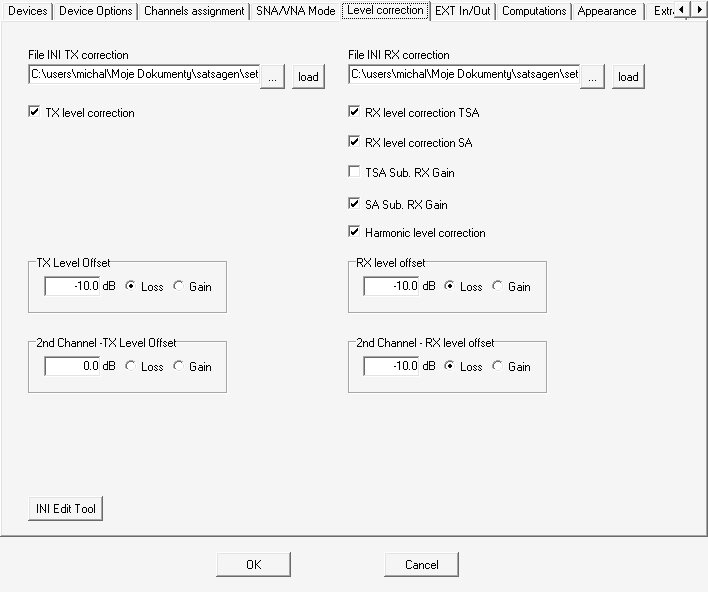
On the Custom Display Format tab, switch the traces to CH2 Logmag and CH2 Phase. SATSAGEN determines the mode (S11 or S21) based on the kind of traces enabled.
Thru-Isoln (TI) calibration
Similarly to SOL for S11, the S21 measurement requires its own calibration, consisting of two steps. They are performed on the VNA
Calibration tab:
- Isoln — the ends of both cables are terminated with 50 Ω loads, so no signal can pass between them. This measures the leakage inside the Pluto and between the cables.
- Thru — the cables are joined with an SMA female-to-female barrel. This sets the 0 dB and 0° reference.
Do not forget to click Apply afterward.
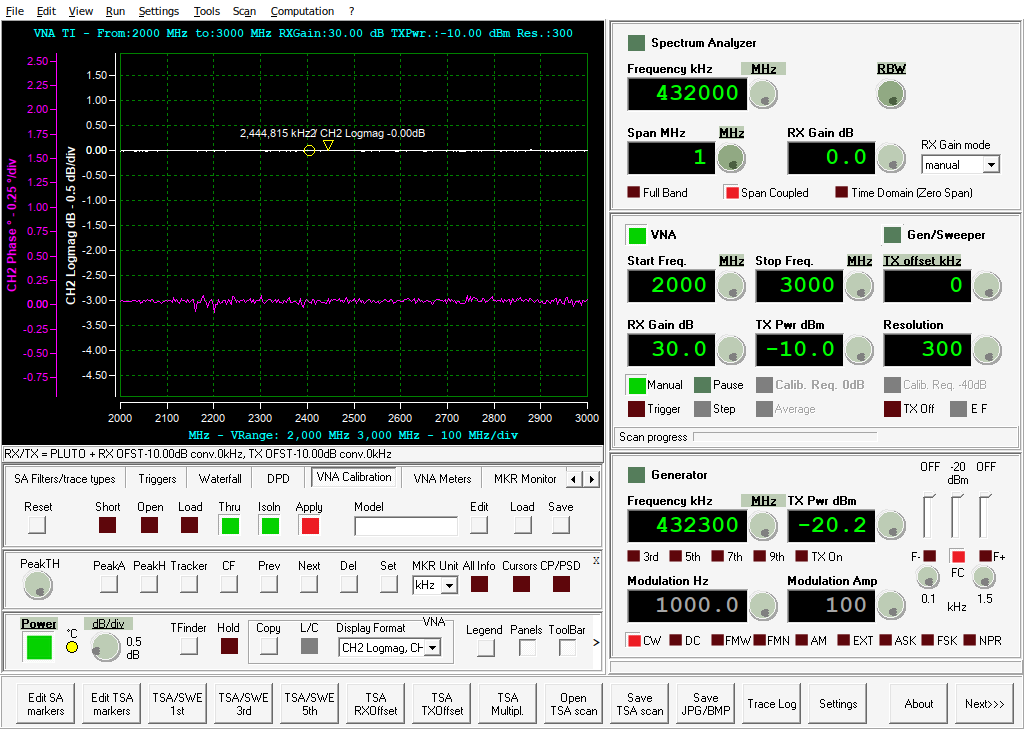
After calibration with the barrel still connected, the chart should show a flat line at 0 dB and 0° of phase:
FERROCOM isolator
The FERROCOM isolator, measured above for S11, is placed between the cables:
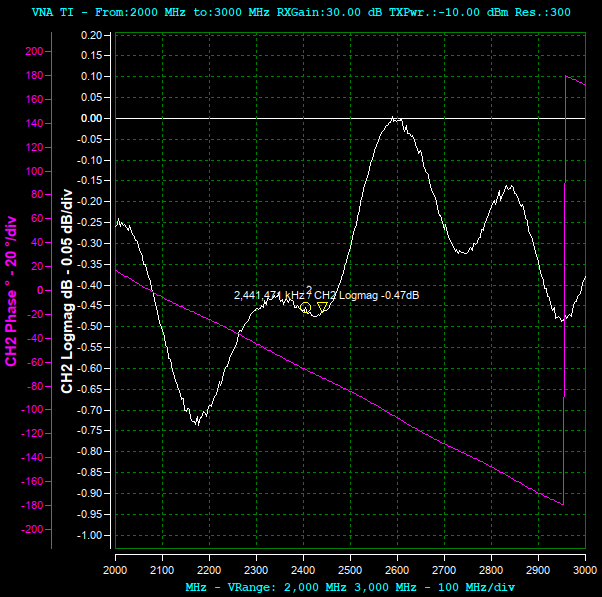
This is the response in the forward direction, the one the isolator is supposed to conduct. The insertion loss is ~0.5 dB at 2.4 GHz:
This is the response in the opposite direction (for example, modeling the signal path from the antenna back to the amplifier). The isolation is better than 18 dB:
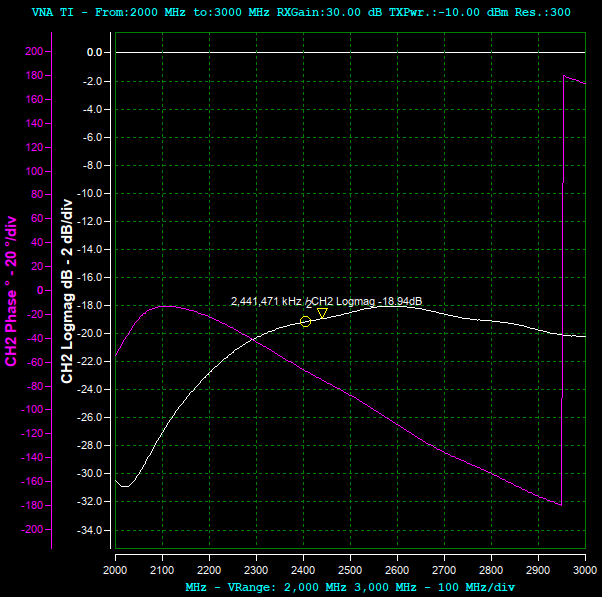
The violet phase trace, at first glance, seems to be garbled: at 2.95 GHz it jumps from -180° to +180°. It is not an error, though. SATSAGEN, like most VNAs, shows the phase wrapped to the range -180° – +180°, so -181° is drawn as +179°. The real phase keeps descending smoothly.
The phase falls linearly with frequency, by about 200° over 950 MHz. That is simply the time the signal needs to pass through the isolator: the slope corresponds to a delay of about 0.57 ns, which is some 17 cm in the air or about 12 cm in a PTFE-filled coax.
Variable attenuator
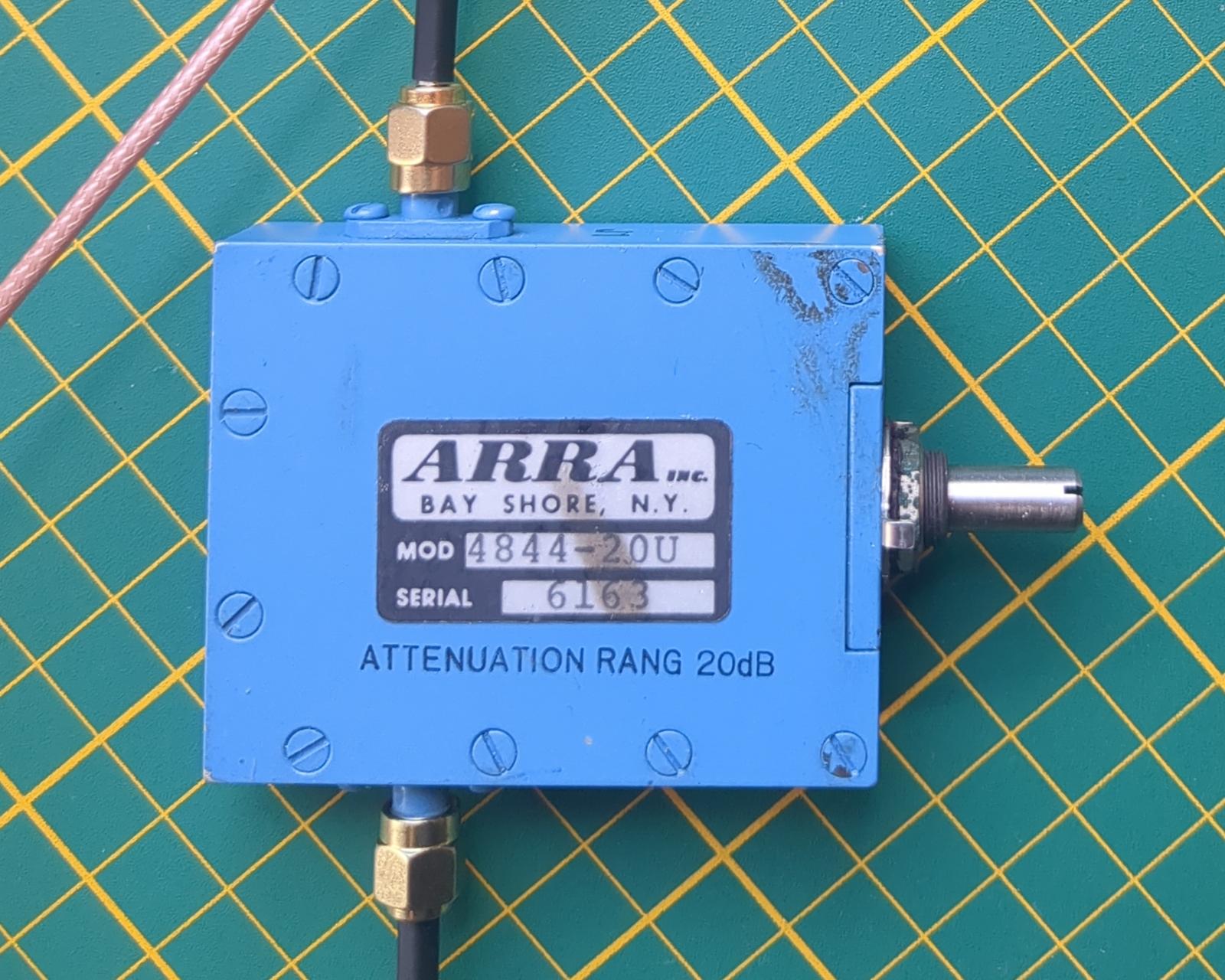
I have an ARRA 0 – 20 dB variable attenuator; the seller claims a frequency range of 2 – 4 GHz. For reference, the markings on the attenuator:
ARRA INC.
BAY SHORE, N.Y.
MOD 4844-20U
ATTENUATION RANG 20 dB
The dial can be turned many times; I didn’t count how many.
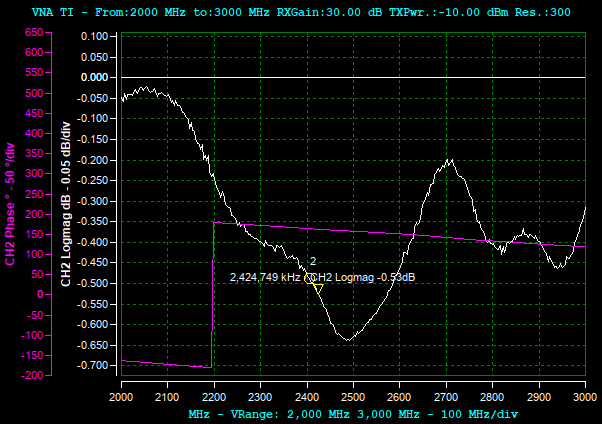
These are the traces at minimal attenuation. The attenuation is low, 0.6 dB at most. Again, the phase trace wraps around from -180° to +180° at 2.2 GHz:
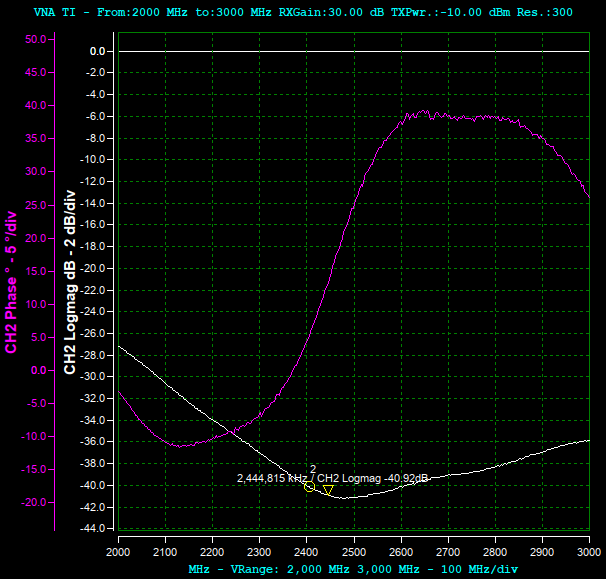
After increasing the attenuation to about 15 dB, the phase trace doesn’t wrap this time, as turning the dial also changes the phase offset. Note the different scale of the phase axis:
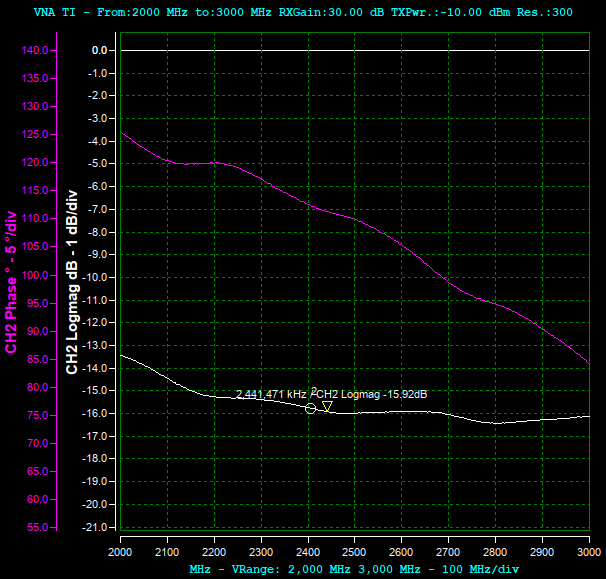
At maximal attenuation, at every measured frequency the attenuation is greater than 25 dB. The specified 20 dB seems to be the guaranteed range; in practice, the attenuator can go further.
Tips and final thoughts
Some tips when taking measurements with VNAs:
- Calibrate every time you change the frequency range, the resolution or anything in the cabling. In SATSAGEN, click
Apply; without it, the calibration is simply ignored. - Tighten the SMA connectors properly, see the section about cables. A loose joint makes the traces jump around.
- Use decent SMA cables and don’t bend them between the calibration and the measurement.
- Keep the enclosure closed. With my Pluto+ opened, the measurements were garbage.
- Stay away from Wi-Fi and Bluetooth devices when measuring antennas, because they share the 2.4 GHz band.
- Remember it’s not a professional instrument. For S11 measurements such as antenna tuning, ~40 dB of dynamic range is plenty. For S21 of filters with steep slopes and deep stopbands (interdigital filters etc.), it may be too little for precise measurements.
SATSAGEN has a lot more options than I described here; I encourage you to play with them. The Pluto+ with a surplus coupler won’t replace a professional VNA, but for tuning antennas it does the job nicely.
I’m still a beginner in the RF arcana, so if you notice any mistakes or have suggestions, I’d be glad to hear from you.